Who Has the Best AI Agent for Security Questionnaires
The answer depends on how you measure "best." The fastest tool is not always the safest. The smartest model is not always the most useful. Here is how to find the right fit for your team.
The best AI agent for security questionnaires (short answer)
The best AI agent is the one that drafts accurate answers, reuses approved language, and still keeps humans in control. That is the short answer.
About 70 to 90 percent of B2B enterprise deals require some form of security questionnaire. That is a lot of paperwork. And there is no public benchmark that ranks tools by "best." So buyers have to evaluate based on their own criteria.
The rest of this article explains what those criteria should be. If you want to skip ahead, jump to the PyraBuilds AI agents section to see how we think about this problem.
The short list most buyers consider (before they decide)
Most teams evaluate tools in three buckets:
- Compliance platforms with questionnaire automation (example: Vanta)
- Customer trust centers with AI answers (examples: Conveyor, SafeBase)
- Response libraries used for RFPs and security questionnaires (examples: Loopio, Responsive)
These examples are here to help you compare approaches, not to endorse any vendor.
What "best" actually means in this context
"Best" does not mean smartest model. "Best" means lowest risk, fastest review, and a clean audit trail.
Most security questionnaires contain 100 to 300 questions. Legal and security teams often review answers 2 to 4 times per questionnaire. That adds up fast.
Here is a short checklist to evaluate any AI agent for security questionnaire automation:
- Accuracy on first draft. Does it get the answer right the first time?
- Reuse of approved answers. Can it pull from past responses you already approved?
- Human review workflow. Is there a clear step where humans approve before sending?
- Auditability. Can you trace who approved what and when?
- Speed. How fast can you complete a full questionnaire?
- Ease of setup. Can your team start using it this week?
- Security posture. Does the tool meet your own security standards?
If you are exploring enterprise security automation, these criteria should guide every conversation.
What the top tools actually do (feature checklist)
If a tool claims it is "best," it should do most of the following:
- Approved answer bank + exact reuse: finds a matching approved answer and uses it first.
- Draft only when needed: generates a new answer only when no approved answer exists.
- Evidence links or references: attaches the policy, control, or source that supports the answer.
- Human approval gates: flags unknowns and requires a person to approve before anything is sent.
- Audit trail: shows what changed, who approved it, and when.
- Fast completion workflow: reduces the work from hours to minutes by removing repetition.
- Easy setup: works with your existing docs and process, not a months-long migration.
If a tool cannot do these, it may be fast, but it will not be safe.
Who this matters for (and who it does not)
If security questionnaires never block deals for you, this article will feel boring.
But if you are doing multiple questionnaires per month, or if your security team is drowning in review cycles, keep reading.
Early-stage teams with few enterprise deals
You probably do not need an AI agent yet. Manual copy and paste works fine at low volume. Focus on product first.
Growth-stage teams doing multiple questionnaires per month
This is where AI agents shine. You have enough volume to see ROI. You have enough history to train the agent on good answers.
Enterprise teams with dedicated security and legal review
You need a system that fits your existing workflow. AI agents should reduce work for your reviewers, not create new work.
The three approaches teams use today
Every team answering security questionnaires fits into one of these three buckets.
Manual process
Someone on the team opens the questionnaire, reads each question, and types an answer. They might copy from old questionnaires. They might ask a colleague. It takes 8 to 14 hours per questionnaire.
General productivity studies show that manual document work consumes 20 to 30 percent of knowledge worker time. Security questionnaires are a big chunk of that.
Generic AI tools
Some teams use ChatGPT or similar tools to draft answers. This helps with speed. But generic AI tools lack context. They do not remember what you approved last month. They cannot pull from your policy docs unless you paste them in.
Understanding the difference between AI agents vs agentic AI helps clarify why context matters so much.
Purpose-built AI agents
These tools are built specifically for security questionnaires. They learn from your approved answers. They integrate with your review workflow. They create an audit trail automatically.
Here is how buyers often think about the landscape:
- Vanta: commonly positioned as a compliance platform that helps generate questionnaire answers from saved knowledge, prior responses, and security/compliance artifacts.
- Conveyor: commonly positioned as a trust workflow (trust center + Q&A) that helps prospects self-serve answers and reduces back-and-forth.
- SafeBase: commonly positioned as a trust center that centralizes security documentation and answers in one place.
- Loopio / Responsive: commonly used as response libraries for RFPs that some teams adapt to security questionnaires when they already live in those tools.
The point is not the logo. The point is the workflow: reuse approved language, route uncertain items to humans, and leave an audit trail.
Why most approaches fail under pressure
Here is what breaks when deal volume increases:
- Manual fails due to inconsistency and fatigue. People give different answers to the same question. They make typos. They forget what they said before.
- Generic AI fails due to hallucination risk and lack of reuse. It might make up an answer that sounds right but is not accurate. It does not remember approvals.
- Ad-hoc systems fail when volume increases. Spreadsheets and shared docs break down at scale.
Rework often adds 30 to 50 percent more time per questionnaire. Follow-up questions increase when answers vary across deals.
"The leverage isn't speed—it's memory. Once a system remembers what humans approved, every future questionnaire gets easier, faster, and safer by default."
The workflow that actually works (step by step)
The goal is not to remove humans. It is to remove repetition.
Here is how a good security questionnaire AI agent works:
- Question intake. The agent reads the questionnaire. It identifies each question and maps it to categories.
- Draft using approved knowledge. The agent checks your library of approved answers. If it finds a match, it uses that. If not, it drafts a new answer based on your policies.
- Flag unknown or risky areas. Anything the agent is not sure about gets flagged for human review.
- Human review. Your security or legal team reviews flagged items. They approve, edit, or reject.
- Approval and reuse. Approved answers go back into the library. Next time, the agent can use them without review.
This loop is how teams using AI lead scoring tools and security automation together see compound gains over time.
If we were building this from scratch today (Pyra blueprint)
If you want "best," build around four modules. This is the blueprint we use.
1) Approved Answer Library (the reuse engine)
Store every approved answer with:
- owner (security/legal)
- last approved date
- source link (policy or control reference)
- tags (access control, encryption, incident response, etc.)
The agent should always try to reuse an approved answer before drafting anything new.
2) Evidence & references (why the answer is true)
When the agent drafts or reuses an answer, it should attach the supporting source:
- policy doc section
- control name/ID
- SOC2/ISO artifact location
- internal link
This reduces follow-ups because your answers are not just "claims." They are supported.
3) Review gates + audit trail (humans stay in control)
The agent should:
- flag uncertain questions
- route them to the right approver
- capture edits
- record approvals
No approval = no send. Fast is useless if it creates risk.
4) Speed layer (optional): portal help + trust center
At scale, speed comes from reducing friction:
- a portal-friendly workflow that helps you answer inside online questionnaires
- a trust center where buyers can self-serve common answers and docs
Not every team needs this on day one. But at enterprise volume, it can remove entire email threads.
"Best" is a system that learns from approvals, reuses what is correct, and makes review easier every time.
Security questionnaire automation tools (high-level comparison)
The goal is not to pick the most famous tool. It is to pick the tool that fits your workflow and risk tolerance.
| Tool / Approach | Best for | Strength | Tradeoff | Notes |
|---|---|---|---|---|
| Manual process | Low volume | No tooling required | Slow, inconsistent, hard to scale | Typically 8-14 hours per questionnaire |
| Generic AI (ChatGPT-style) | Drafting help | Fast first draft | Risky without context; weak reuse | Requires heavy human review |
| Vanta-style approach | Compliance-led teams | Centralized artifacts + reuse | May require process alignment | Often positioned around compliance evidence |
| Conveyor-style approach | High inbound trust requests | Self-serve trust workflows | Depends on what you publish | Often positioned around trust center + Q&A |
| SafeBase-style approach | Trust center model | Centralized security docs | Still needs governed answers | Often positioned around buyer self-serve |
| Loopio / Responsive-style approach | Teams already using RFP libraries | Strong reuse + collaboration | Needs security-specific governance | Often adapted from RFP workflows |
| Pyra approach (build-to-fit) | Enterprise workflows | Approved answer library + human gates + audit logic | Requires initial setup | Built to match how your team actually approves answers |
What matters most is whether the system can reuse approved answers, enforce review, and stay auditable.
Diagram explanation: how a purpose-built AI agent handles questionnaires
The diagram below shows the loop: draft, reuse, review, approve.
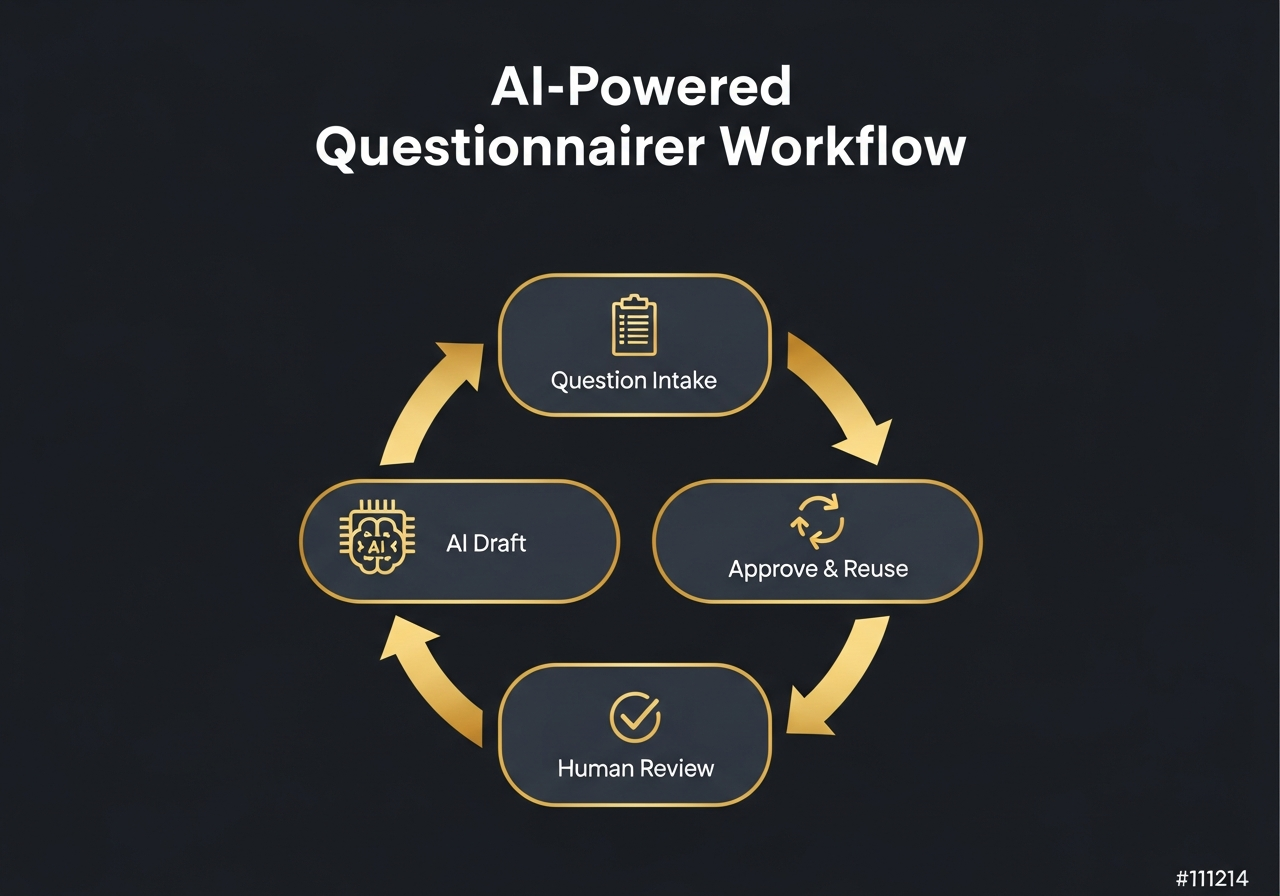
The agent gets better because the system remembers what humans approved.
Every time a human approves an answer, that answer goes into the knowledge base. Next time the same question appears, the agent uses the approved version. No new review needed.
This is how enterprise teams cut review cycles from multiple rounds to almost none. The same principle applies to best AI phone call agent systems that learn from successful conversations.
"Good agents don't replace judgment. They preserve it. Every approval becomes part of the system, not something you have to rediscover next quarter."
Common mistakes teams make with AI and security questionnaires
Here are the mistakes we see most often:
- Letting AI answer without review. This is the fastest way to lose trust. Always have a human approve before sending.
- Not locking approved language. If you do not save what worked, you will waste time recreating it.
- Treating questionnaires as one-off tasks. Each questionnaire teaches your system. Treat them as training data.
- Using different answers for the same question. Inconsistent answers are one of the top reasons for follow-up security reviews.
Quick summary (Abstract)
Here is everything you need to remember:
- "Best" means accurate, fast, auditable, and human-controlled.
- Purpose-built AI agents beat generic AI tools because they reuse approved answers.
- Most teams can cut questionnaire time from 8+ hours to under 30 minutes.
- The agent gets smarter over time as humans approve more answers.
- Consistency across deals reduces follow-up questions and builds trust.
- Growth-stage and enterprise teams see the most ROI.
- Always keep humans in the loop for approval.
Further reading (tool examples)
If you want to explore the tools mentioned in this article, here are links to learn more:
- Vanta - Compliance automation platform
- Conveyor - Customer trust platform
- SafeBase - Trust center for security teams
- Loopio - RFP response software
- Responsive - Strategic response management
These links are provided for research purposes. Pyra is not affiliated with these vendors.
Frequently asked questions
Who has the best AI agent for security questionnaires?
The best AI agent is built for real security workflows. It drafts answers, reuses approved language, and cuts review cycles while humans stay in control.
Can AI agents safely answer security questionnaires?
Yes. Use agents to draft. Let your security team approve. That cuts busywork without losing control.
How much time can AI agents save on security questionnaires?
Many teams cut time from 8 to 14 hours down to under 30 minutes by drafting and standardizing answers with agents.
What should companies look for in an AI security questionnaire tool?
Look for approved answer reuse, clean review flow, audit trail, and easy setup inside your current process.