Best Champion Tracking Tools for B2B Sales in 2026: 6 Compared
The best champion tracking tools for B2B sales compared on nine criteria: UserGems, ZoomInfo Tracker, Unify, Common Room, Apollo.io and Clay, plus where Lead Seeker fits, from vendor pages reviewed Nov 16, 2026.
Short answer: the best champion tracking tools for B2B sales alert you when a past buyer or user changes employers and carry that move into your CRM without a duplicate record. Of six tools reviewed on November 16, 2026, UserGems describes the most complete workflow at $40,000 a year; Unify, Common Room, Apollo.io and Clay add job-change tracking to a signals, prospecting or workflow tool, with plan requirements and prices that differ; ZoomInfo Tracker needs a higher package.
This guide is for sales, revenue operations and customer success leads at B2B companies with a list of past customers, closed-won contacts or power users worth reconnecting with. Champion changes matter more when the account still fits, so the comparison also looks at what each tool does after the move. Pyra makes Lead Seeker, which is not a champion tracker, so it is placed beside the six tools and judged on the same criteria. Each fact comes from the vendor's page reviewed on November 16, 2026; "not described" means the page did not say.
What champion tracking tools actually do
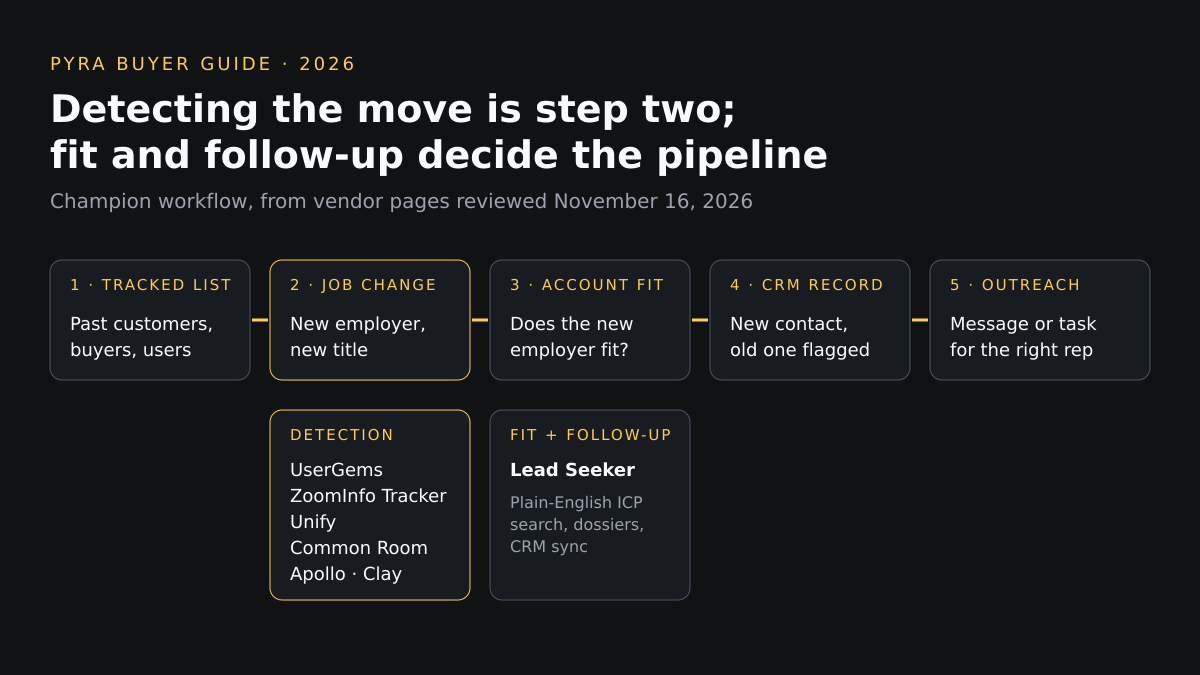
Champion tracking follows named people who bought, used or advocated for your product, then flags the moment one joins another company. It is different from intent data, which estimates which accounts are researching a topic. A tracked move is a person, a company and a date, so the next question is whether that company fits and who else there should hear from you. Several of these tools stop at the alert; the comparison below shows which ones also route, enrich and sync the result.
How we compared champion tracking tools
Nine criteria, applied to every option from its own public pages.
| Criterion | The question it answers |
|---|---|
| Data and source transparency | Does the page say where job-change data comes from? |
| Contact verification | Is the new contact checked, or only matched? |
| Intent and buying signals | How does it detect a move, and how often? |
| ICP filtering | Can you decide whether the new company fits before outreach? |
| Dossier and context depth | Does the moved person arrive with history from the old record? |
| CRM and export workflow | Does the move reach your CRM without duplicating the record? |
| Automation controls | What runs on its own, and what consumes credits? |
| Pricing | Is the price on the public page? |
| Small versus enterprise fit | Does the plan structure suit your team size? |
Most search results for this query are vendor-written lists, and several rank their own product first; here only vendor documentation, help centers and pricing pages were used, and the profiles say when a claim is the vendor's own. No tool was tested hands-on, and no scores are given.
Champion tracking tools compared
Scroll sideways on small screens.
| Tool | Detection and cadence | ICP filtering | CRM and export | Pricing shown |
|---|---|---|---|---|
| UserGemsDedicated job-change and champion tracking | A Past Champions signal built from tracked contacts; each tracked contact is scanned weekly or monthly depending on the license | Criteria for routing include whether the new company is a target account, past relationship, buyer versus user persona, seniority and usage data | Salesforce and HubSpot are listed on the pricing page, with Outreach, Salesloft and Gong Engage under sales engagement | Core $40,000 a year, Advanced $75,000, Elite $150,000, plus a one-time implementation fee of $3,000 to $10,000 and an optional $3,000 retroactive job-change lead fee (pricing page, Nov 16, 2026) |
| ZoomInfo TrackerJob-change tracking inside a contact database | Tracker reviews tracked contacts weekly and alerts on verified job changes; ZoomInfo's guide also lists promotions and internal moves | The guide describes plays for new decision-makers in ICP accounts and stacking job changes with intent signals; Tracker setup is by list | Alerts can lead to email, export to a CRM, tagging or sharing with a team; the guide mentions routing to CRM or Slack | Not published; the help article (dated April 9, 2025) says Tracker is available with Sales Elite+, Copilot Advanced and Copilot Enterprise packages |
| UnifyOutbound platform with champion tracking | Champion tracking checks the selected people every 30 days; a Job change signal is available in person filters | You choose companies and people with the filter builder, for example companies with a closed-won opportunity narrowed to buyer personas | HubSpot and Salesforce sync is listed on the Pro plan as read-only on the pricing page | Free; Base $20 per seat per month; Pro $60 per seat per month; Business custom, billed annually (pricing page, Nov 16, 2026) |
| Common RoomSignal platform with job-change signals | A Job change contact signal with a filter for the person's previous organization, so past customers can be isolated; included on all plans per the docs | Smart segments and alerts surface past champions and high-fit job changers | Salesforce and HubSpot CRM are among the integrations in the documentation; the product page names duplicate records created for every job change as a status-quo problem | Not published on the pages reviewed |
| Apollo.ioProspecting database with job change alerts | Apollo Refresh alerts you when designated contacts change jobs; a Job Change filter finds saved contacts who moved | Apply Apollo's search filters to the contacts who changed jobs; the pages describe filters rather than champion-specific rules | Apollo's enrichment page lists CRM enrichment through regular syncs, CSV enrichment and an API | Free to get started per the product page; job change enrichment is limited to paid plans, and plan prices were not captured on the pages reviewed |
| ClayWorkflow builder with a job change signal | A Job Change signal monitors contacts in a table and can add a row when a contact's current company no longer matches your records | You build the filtering in the table; the signal page does not prescribe ICP rules | The page lists automatic CRM updates as an operations use case; the setup is built in your table | Per-check cost stated; the signal is listed on the Starter plan; plan prices were not captured on the page reviewed |
| Lead SeekerProspect intelligence (adjacent, not a champion tracker) | Watches 47 public signal types, including job changes and promotions, funding, stack changes and statements; the pages reviewed do not describe tracking a list of your own past champions | You describe the buyer in plain English; Lead Compass takes your website, ICP and intent themes | Native Salesforce and HubSpot sync on every paid plan and the Pilot; spreadsheet, PDF and Word exports | Pilot $99 one-time (50 Lead Units, 14 days); Starter $149, Growth $499, Scale $1,299 a month; Enterprise from $4,500 a month; 5 leads free (pricing page, Nov 16, 2026) |
Profiles
Dedicated job-change and champion tracking
UserGems
Best for: Revenue teams that want champion moves turned into CRM records and routed to outreach automatically, with a budget for an annual contract.
Data source: You upload or auto-import the people to track from CRM reports or a CSV; the data source for the new job details is not described on the pages reviewed. Verification: Not described; the new record is said to carry the person's new company, title, email, phone and LinkedIn.
Detection: A Past Champions signal built from tracked contacts; each tracked contact is scanned weekly or monthly depending on the license. ICP filtering: Criteria for routing include whether the new company is a target account, past relationship, buyer versus user persona, seniority and usage data.
Context: The new contact is linked to the old record, which is flagged "No longer there", and existing data such as usage or NPS carries over. CRM and export: Salesforce and HubSpot are listed on the pricing page, with Outreach, Salesloft and Gong Engage under sales engagement.
Automation controls: Alerts by email, Slack and Salesforce tasks; rules push leads into outreach sequences; each tracked contact consumes a tracked credit.
Pricing: Core $40,000 a year, Advanced $75,000, Elite $150,000, plus a one-time implementation fee of $3,000 to $10,000 and an optional $3,000 retroactive job-change lead fee (pricing page, Nov 16, 2026). Team size: Priced for teams with an annual budget in the tens of thousands of dollars; Core lists TAM coverage of 2,000 to 4,000 accounts.
Strength: The CRM workflow is described end to end: tracked list in, new linked record out, routing rules, and an old record that is flagged rather than deleted.
Limitation: The lowest published plan is $40,000 a year, and the pages reviewed do not say where the new contact details come from or how they are verified.
Verify before relying on it: Where contact data comes from, how a detected move is confirmed, and how many tracked contacts the plan covers.
Source: UserGems contact tracking, help center and pricing pages (reviewed November 16, 2026).
Job-change tracking inside a contact database
ZoomInfo Tracker
Best for: Teams already on ZoomInfo that want weekly checks on a list of important contacts.
Data source: ZoomInfo's own guide describes a verified B2B data foundation of 500M+ contacts; that count is the vendor's claim. Verification: Tracker sends alerts for "verified job changes"; the method of verification is not described on the pages reviewed.
Detection: Tracker reviews tracked contacts weekly and alerts on verified job changes; ZoomInfo's guide also lists promotions and internal moves. ICP filtering: The guide describes plays for new decision-makers in ICP accounts and stacking job changes with intent signals; Tracker setup is by list.
Context: Contact data from the ZoomInfo database; the pages reviewed do not describe a dossier. CRM and export: Alerts can lead to email, export to a CRM, tagging or sharing with a team; the guide mentions routing to CRM or Slack.
Automation controls: You upload a CSV or choose a saved list; up to 5,000 contacts per user can be tracked.
Pricing: Not published; the help article (dated April 9, 2025) says Tracker is available with Sales Elite+, Copilot Advanced and Copilot Enterprise packages. Team size: Packages are sold through sales, so it suits larger teams that already use ZoomInfo.
Strength: A stated weekly review cadence and a stated 5,000-contact limit per user make the scope easy to compare.
Limitation: Tracker is tied to higher packages, no price is shown, and the help article is dated April 2025.
Verify before relying on it: Whether Tracker is in your package, how a move is verified, and whether the April 2025 article still matches the product.
Source: ZoomInfo Tracker help article and job change alerts guide (reviewed November 16, 2026).
Outbound platform with champion tracking
Unify
Best for: Teams that want champion moves to feed outbound plays in the same tool that finds and contacts prospects.
Data source: Unify says it finds updated contact information when it detects a new job and lists 40+ data sources on its site; which source supplies job changes is not described. Verification: Not described.
Detection: Champion tracking checks the selected people every 30 days; a Job change signal is available in person filters. ICP filtering: You choose companies and people with the filter builder, for example companies with a closed-won opportunity narrowed to buyer personas.
Context: The Job changes tab shows the person's new company and role; the old job records are excluded from outreach. CRM and export: HubSpot and Salesforce sync is listed on the Pro plan as read-only on the pricing page.
Automation controls: A champions trigger can route moved people through a play for qualification, outreach or a Slack alert; each tracked champion consumes credits per cycle whether or not a move is found.
Pricing: Free; Base $20 per seat per month; Pro $60 per seat per month; Business custom, billed annually (pricing page, Nov 16, 2026). Team size: Pricing lists self-serve plans from Free; the docs list champion tracking as a Business-plan capability, so confirm which plan includes it.
Strength: The docs state the check interval and that credits are used each cycle even when no move is found, which makes the running cost easier to forecast.
Limitation: The pricing page lists job change and hiring signals on Base, while the champion tracking docs list the Business plan; credits are consumed even when nothing changes.
Verify before relying on it: Which plan includes champion tracking for your account, the credit rate shown in your workspace, and whether the CRM sync is read-only.
Source: Unify champions docs, credit docs and pricing page (reviewed November 16, 2026).
Signal platform with job-change signals
Common Room
Best for: Teams that want job changes stacked with community, product and website signals.
Data source: Job change information comes from LinkedIn, per Common Room's documentation (updated September 25, 2026). Verification: The product page describes identity resolution and waterfall enrichment for movers; verification of each contact is not described.
Detection: A Job change contact signal with a filter for the person's previous organization, so past customers can be isolated; included on all plans per the docs. ICP filtering: Smart segments and alerts surface past champions and high-fit job changers.
Context: Movers are shown with fresh titles, contact info, firmographics and past engagement history, per the product page. CRM and export: Salesforce and HubSpot CRM are among the integrations in the documentation; the product page names duplicate records created for every job change as a status-quo problem.
Automation controls: Team alerts and an outbound agent, RoomieAI Activate, that uses job change and other signals.
Pricing: Not published on the pages reviewed. Team size: Aimed at teams running outreach on many signal types; the pages reviewed do not describe a small-team plan.
Strength: Job change is one signal among many, so a champion's move can be combined with prior product or community activity.
Limitation: The source is stated as LinkedIn only, and no price is shown on the pages reviewed.
Verify before relying on it: How often job changes refresh, how job-change records are handled in your CRM, and the plan price.
Source: Common Room job change page and documentation (reviewed November 16, 2026).
Prospecting database with job change alerts
Apollo.io
Best for: Teams already prospecting in Apollo that want alerts on a saved list of key contacts.
Data source: Job change data comes from Apollo's database; the underlying source is not described. Verification: Not described on the pages reviewed.
Detection: Apollo Refresh alerts you when designated contacts change jobs; a Job Change filter finds saved contacts who moved. ICP filtering: Apply Apollo's search filters to the contacts who changed jobs; the pages describe filters rather than champion-specific rules.
Context: You can update the existing record with the new data or create a new record for the person. CRM and export: Apollo's enrichment page lists CRM enrichment through regular syncs, CSV enrichment and an API.
Automation controls: An admin turns on Job Change Alerts in settings; enrichment uses credits whether you update or create a record.
Pricing: Free to get started per the product page; job change enrichment is limited to paid plans, and plan prices were not captured on the pages reviewed. Team size: Free to get started, but job change features need a paid plan; suits teams that already use Apollo.
Strength: Job changes sit next to a prospecting database, so a moved contact's account can be searched in the same tool.
Limitation: Job change enrichment needs a paid plan and credits, and champion-specific tracking rules are not described.
Verify before relying on it: Credit cost per job change enrichment and which paid plan includes alerts.
Source: Apollo job change alerts page and knowledge base (reviewed November 16, 2026).
Workflow builder with a job change signal
Clay
Best for: Operations teams that want to build their own champion-tracking table and route results where they choose.
Data source: Not described on the page reviewed; each monitored row needs a LinkedIn URL as its identifier. Verification: Not described.
Detection: A Job Change signal monitors contacts in a table and can add a row when a contact's current company no longer matches your records. ICP filtering: You build the filtering in the table; the signal page does not prescribe ICP rules.
Context: You can add enrichments to gather more data on the moved contact. CRM and export: The page lists automatic CRM updates as an operations use case; the setup is built in your table.
Automation controls: You set how often the signal runs; each check consumes 1 action plus 0.2 data credits.
Pricing: Per-check cost stated; the signal is listed on the Starter plan; plan prices were not captured on the page reviewed. Team size: Flexible for teams with someone to build and maintain the workflow.
Strength: The cost of each check is stated, and the frequency is yours to set.
Limitation: It is a building block, not a finished champion tracker, and every row needs a LinkedIn URL.
Verify before relying on it: How many rows you will monitor at your frequency and the resulting monthly credit use.
Source: Clay job change signal documentation (reviewed November 16, 2026).
Prospect intelligence (adjacent, not a champion tracker)
Lead Seeker
Best for: Checking whether the company a champion moved to fits your ICP, then getting verified contacts and a dossier into the CRM. Pyra makes Lead Seeker.
Data source: Each prospect shows the public signal that surfaced them, with a source named on the dossier. Verification: Each saved prospect arrives with a verified contact.
Detection: Watches 47 public signal types, including job changes and promotions, funding, stack changes and statements; the pages reviewed do not describe tracking a list of your own past champions. ICP filtering: You describe the buyer in plain English; Lead Compass takes your website, ICP and intent themes.
Context: A source-backed page with verified contact, a DISC read from public writing, the trigger and an editable opening line. CRM and export: Native Salesforce and HubSpot sync on every paid plan and the Pilot; spreadsheet, PDF and Word exports.
Automation controls: Lead Units are used when you run a search; exports and CRM syncs of saved results use no new credits; it does not run sequences.
Pricing: Pilot $99 one-time (50 Lead Units, 14 days); Starter $149, Growth $499, Scale $1,299 a month; Enterprise from $4,500 a month; 5 leads free (pricing page, Nov 16, 2026). Team size: Pilot and Starter for small teams; Enterprise from 20 seats.
Strength: It answers the question a move alert leaves open: does the new employer fit, and who else there should you contact?
Limitation: It does not monitor a list of your past customers for moves, it does not run sequences, and it does not track AI answers.
Verify before relying on it: Whether your champion workflow needs list-based tracking, which Lead Seeker does not describe, and how many Lead Units your searches use.
Source: theleadseeker.com home and pricing pages (reviewed November 16, 2026).
What this guide does not rank
Perplexity, ChatGPT and other AI answer engines are not champion trackers, and rank trackers for them belong in our Perplexity rank tracker guide. For wider relationship and warm-introduction tools, see the relationship intelligence comparison.
From a champion move to a qualified account
A move alert says someone left; it does not say whether the new employer is worth a call. Treat each alert as the start of three checks: does the new company match your ICP, who else there has a verified contact and a recent reason to talk, and is there evidence the person held budget or influence before. Lead Seeker's role sits in the first two checks; our Lead Seeker product page describes the plain-English search and dossier workflow. For how buying signals differ from third-party intent feeds, see how buying signals differ from intent data.
When intent signals need to become qualified account selection, campaign execution or sales activation, Percepture's B2B intent data services connect signal interpretation to ICP targeting and a strategy team's review. For a how-to on qualifying leads from those signals, see using intent data to identify sales-qualified leads.
Champions who change jobs also search for vendors. An AI visibility tracker such as Prime records what ChatGPT, Claude, Perplexity and Gemini name and cite for your buyer questions; it does not monitor Google organic rankings and it does not track job changes. Prime's guide to choosing an AI visibility tool scores six axes (engines covered, refresh cadence, prompt ownership, metric definitions, raw-data export and pricing) and suggests trialing with ten of your own buyer prompts. These are separate jobs, not interchangeable ones: Prime covers early discovery in AI answers, Lead Seeker covers prospect research and verification, and the champion trackers above cover the move itself. Pyra's AI sales agents page covers how we add approval gates when an agent acts on these signals.
Champion tracking: questions buyers ask
What are the best champion tracking tools for B2B sales?
On the pages reviewed on November 16, 2026, UserGems describes the most complete champion workflow (tracked list, linked new record, routing rules) at a published starting price of $40,000 a year. Unify, Common Room, Apollo.io and Clay add job-change features to a signals, prospecting or workflow tool, with different plan requirements and mostly unpublished or partial prices (see the profiles), and ZoomInfo's Tracker is limited to higher packages. Choose by where your list of past champions lives and whether the move reaches your CRM without a duplicate record.
What is champion tracking?
Champion tracking follows people who bought, used or advocated for your product and alerts you when they move to a new employer, so you can reconnect in the new role. Unify's documentation describes it as following people who know your product as they move to new companies. The signal is only a starting point: the new company still has to fit your ICP.
How often do champion tracking tools check for job changes?
It varies. ZoomInfo's help article says Tracker reviews tracked contacts weekly. UserGems scans weekly or monthly depending on the license. Unify checks every 30 days. Clay lets you set how often the signal runs. Ask how long after a move the alert usually arrives, because the pages reviewed do not state a detection delay.
Does a tracked champion cost credits when nothing changes?
In some tools, yes. Unify's documentation says each tracked champion consumes credits per tracking cycle whether or not a job change is found, and Clay charges 1 action plus 0.2 data credits for each check. UserGems counts each unique tracked contact against a tracked credit. Estimate monthly cost from the size of your list, not from the number of moves you expect.
Which champion tracking tool works for a small team?
Small teams often start where job changes sit inside a tool they already use, but the pages reviewed do not show equivalent champion tracking at equivalent prices. Apollo.io's job change enrichment needs a paid plan and credits, Unify's pricing page lists job change signals from its $20 per seat Base plan while its docs list champion tracking under Business, Common Room's price is not shown, and Clay's job change signal costs 1 action plus 0.2 data credits per check in a table you maintain. UserGems publishes $40,000 a year as its lowest plan and ZoomInfo Tracker needs a higher package. Confirm the plan that includes champion tracking, then trial it on your own closed-won contacts.
Is a job change alert the same as intent data?
No. A job change is a named person, company and date. Intent data estimates which accounts are researching a topic. ZoomInfo's own guide makes the same distinction and suggests stacking the two. Use the move to decide who to contact and intent or fit signals to decide whether the account is worth contacting now.
Sources
Vendor pages reviewed November 16, 2026: UserGems (contact tracking, help center, pricing); ZoomInfo (Tracker help article, job change alerts guide); Unify (champions docs, pricing); Common Room (job change page, documentation); Apollo.io (job change alerts, knowledge base); Clay; Lead Seeker (pricing). Written by Bob Generale, COO and co-founder of Pyra.
Turn champion moves into qualified accounts
Lead Seeker's Pilot gives you a 14-day workspace with 50 Lead Units to test the account-fit and dossier step on your own ICP. If you want Pyra to design the champion workflow end to end, talk with sales.