Best Relationship Intelligence Tools for Warm Introductions in 2026
The best relationship intelligence tools for warm introductions compared on nine criteria: Draftboard, Boomerang AI, Village, Happenstance, Affinity, Introhive and Lead Seeker, with pricing. Reviewed Nov 5, 2026.
Short answer: the best relationship intelligence tools for warm introductions depend on where your relationships live. Draftboard, Boomerang AI, Village and Happenstance are built to find and request introductions; Affinity and Introhive map relationships already inside a firm. Lead Seeker is different: it researches and verifies the people worth asking about, but does not map who knows whom.
Warm introductions begin with useful context. This guide is for B2B sales, partnership and founder-led teams deciding which tool should find the path and which should supply the reasons to use it. Seven options were reviewed on November 5, 2026 against the same nine criteria. Pyra makes one of them, Lead Seeker, and it is held to the same criteria and listed last. Prices are the figures each vendor displayed that day; "not described" means the pages reviewed did not say, not that the feature is absent.
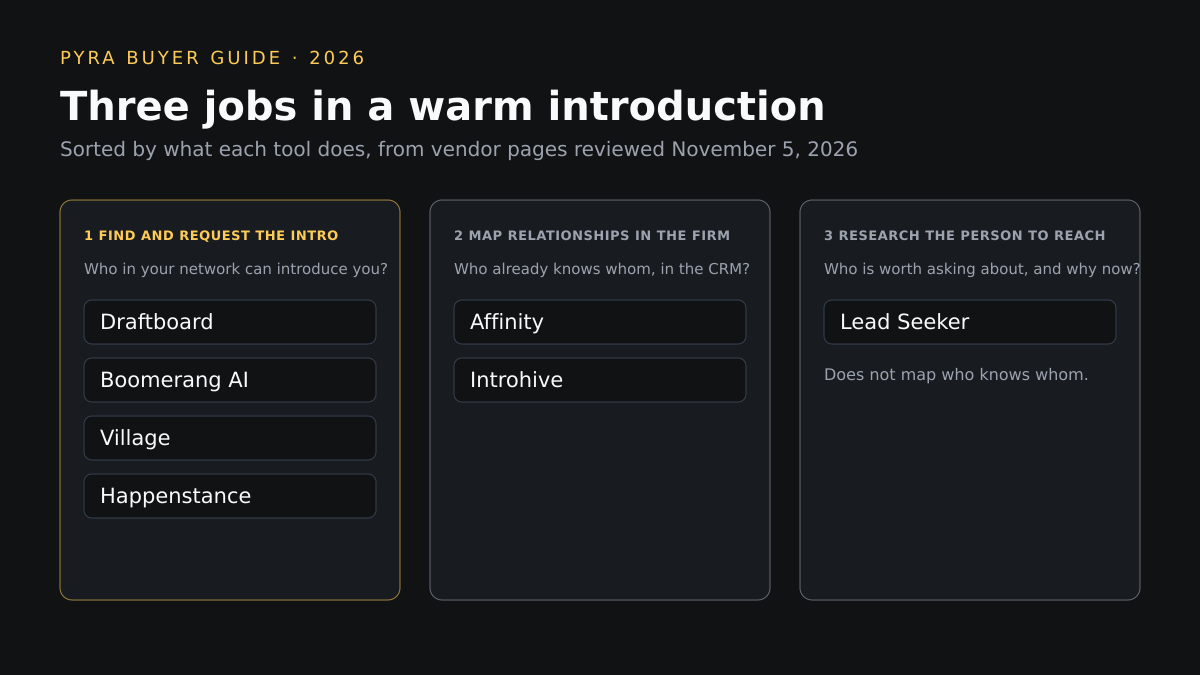
Relationship intelligence tools do three different jobs
Search results for this query mix tools that solve different problems. Introduction platforms such as Draftboard and Boomerang AI score the connectors who can open a door and help you ask. Relationship CRMs such as Affinity and Introhive capture email, calendar and meeting activity so a firm can see who already knows a client or investor. Prospect intelligence answers an earlier question: which accounts and people deserve an introduction at all. Draftboard's own July 2026 guide separates tools that find warm paths from tools that run the whole introduction, and asks where the relationship data comes from; both questions drive the comparison below.
How we evaluated these relationship intelligence tools
Nine criteria were applied to every option using its own public pages. The first six come from the buying job itself, and the last three are practical constraints. Prime's guide to choosing an AI visibility tool uses the same trial-with-your-own-data approach for a different category, scoring engines covered, refresh cadence, prompt ownership, metric definitions, raw-data export and pricing; here the equivalent step is to run each tool on ten accounts you actually want to reach.
| Criterion | The question it answers |
|---|---|
| Data and source transparency | Where does the relationship or prospect data come from, and can you see it? |
| Contact verification | Is the person's contact detail checked, or only matched? |
| Intent and buying signals | Does it show why this account or person is worth contacting now? |
| ICP filtering | Can you describe the buyer you want, not just paste names? |
| Dossier and context depth | Does each path or prospect come with the reasons to act? |
| CRM and export workflow | Does the result reach your CRM or leave as a file? |
| Automation controls | What runs on its own, and what waits for a person's approval? |
| Pricing | Is the price, including what a path or lead costs, on the public page? |
| Small versus enterprise fit | Does the plan structure suit your team size? |
Best relationship intelligence tools for warm introductions compared
Two tables, same seven tools. The first covers where the data comes from, how targets are chosen and what it costs; the second covers verification, signals, context and workflow. Scroll sideways on small screens.
| Tool | Job | Data and source | ICP filtering | Pricing shown | Team fit |
|---|---|---|---|---|---|
| Draftboard | Introduction platform: Finds and requests warm introductions | A Chrome extension maps your professional network from LinkedIn; teammates, investors and customers do not export or upload contacts. Second- and third-degree paths are included | You paste LinkedIn URLs or upload a CSV of target accounts and people | Usage-based at $0.30 per quality path, free to start (its comparison page) | Self-serve, aimed at founders and small teams |
| Boomerang AI | Introduction platform: Runs introduction requests through connectors | Connectors such as customer champions, advisors, investors and employees; the agent maps them from signals, and "Super Connectors" can add a Chrome extension or CSV of their own connections | Target account mapping lists the decision makers at a target account and the path to each | Starter $80 a month billed annually (3 users, 50 connectors); Team $1,000 a month billed annually (10 users, 300 connectors); Company $30,000 a year; 7-day free trial on Starter | Starter for testing one team; Team and Company for multi-user revenue orgs |
| Village | Introduction platform: Network graph with search, lists and warm paths | Imports contacts from LinkedIn, email, calendar and communities; teammates share networks; second- and third-degree connections are mapped from public data (work overlaps, funding history, education) | AI search of people and companies by industry, location and other filters, then shortlists and screening | Core $1 per seat per month with 100 pooled credits per seat; a team plan at $149 a month for 7,500 credits; pay-as-you-go packs from $25; warm intro paths to a person cost 5 credits; Forward-deployed from $10,000 | Individuals and teams on a per-seat plan; a $10,000-minimum tier for larger networks |
| Happenstance | Introduction platform: Searches your own and friends' networks | You connect accounts such as Gmail, Calendar, LinkedIn and X, then add friends and groups; results are ranked by how well you know each person | You describe who you are looking for in natural language | Free forever with usage limits; Pro $24 a month billed yearly; Team $24 per seat | Personal and small-team use; Team plan adds seats and one invoice |
| Affinity | Relationship CRM: Private capital CRM with relationship scoring | Automatic activity capture across email, calendar and meeting notes | Not described for prospecting; built around deal sourcing and portfolio work | Essential $2,000, Scale $2,300, Advanced $2,700 per user per year; Enterprise custom | Priced per user for firms; Enterprise adds fund-level permissions and SSO |
| Introhive | Relationship CRM: Enterprise relationship intelligence for professional services | Automated capture of interactions and contact records; "who knows who" insight surfaces warm introductions inside the firm | Not described | Not published; book a demo | Firm-wide rollout for professional-services organizations |
| Lead Seeker | Prospect intelligence: Researches and verifies who to contact; does not map who knows whom | Each prospect shows the public signal that surfaced them, with a source named on the dossier | You describe the buyer in plain English; Lead Compass takes your website, ICP and intent themes | Pilot $99 one-time; Starter $149, Growth $499, Scale $1,299 a month; Enterprise from $4,500 a month; 5 free leads | Pilot and Starter for small teams; Enterprise from 20 seats |
| Tool | Contact verification | Buying signals | Dossier and context | CRM and export | Automation controls |
|---|---|---|---|---|---|
| Draftboard | Not described | Not described | Each path is scored 0 to 100 with the reason: shared history, mutual connections, seniority and recency | Request tracking from ask to booked meeting; an API and an MCP server are listed in its navigation; CRM sync is not described | Drafts a ready-to-send intro request and tracks it; you decide who to ask |
| Boomerang AI | Not described | Team plan: trigger automations on Clay, Common Room and Outreach signals; job change tracking is listed | Warm path evidence and relationship scoring are listed capabilities | Salesforce, HubSpot and Attio, Google and Microsoft calendars, MCP access and Slack on Team; API credits only on Company | Intro request routing and outcome tracking; trigger automations (up to 3 on Team, unlimited on Company) |
| Village | Email reveals cost 1 credit; how emails are verified is not described | Its demo lists company growth signals and job postings as filters; no intent-data feed is described | Profile enrichment (free if updated within 3 months, 1 credit for realtime) | Unlimited search results and exports on Core; 500+ integrations, an API and an MCP server are listed | Unlimited autopilots (10,000 each) on Core; intro requests are never metered |
| Happenstance | Not described | Not described | Each result shows a short summary and the mutual connections who give a path in | CSV export on Pro; API and MCP use separate credits; CRM sync is not described | Drafts an intro request to your strongest mutual; sending stays with you |
| Affinity | Not described; enrichment from PitchBook, Dealroom and Crunchbase is on the Advanced plan | Advanced plan: company growth insights covering headcount and leadership signals | Complete interaction history across the firm and relationship scoring to the warmest path to a contact | It is the CRM; API and an open platform are listed | Scale and above include AI agents (Affinity Ascend), a notetaker and AI chat |
| Introhive | A separate data quality product; it states 90% data accuracy as its own claim | Flags weakening client relationships and tracks champions and alumni; no external buying-signal feed is described | A 360-degree view of each relationship, with pre-meeting and on-demand email digests | Deep CRM integration; an MCP server is listed to give AI tools relationship context | Data automation and digests; introduction requests are not described |
| Lead Seeker | Each saved prospect arrives with a verified contact | Watches public signal types such as hires, funding, stack changes and statements; Lead Compass turns them into target-account suggestions | A source-backed page with verified contact, a DISC read from public writing, the trigger, and an editable opening line | Native Salesforce and HubSpot sync on every paid plan and the Pilot; spreadsheet, PDF and Word exports; other CRMs via spreadsheet | Lead credits are used only when you choose to run a search; Lead Compass refreshes weekly or on demand |
Profiles
Introduction platform
Draftboard
Best for: Founders and lean sales teams that want the warmest path into a named account without an enterprise contract.
Data and source: A Chrome extension maps your professional network from LinkedIn; teammates, investors and customers do not export or upload contacts. Second- and third-degree paths are included. Contact verification: Not described.
Buying signals: Not described. ICP filtering: You paste LinkedIn URLs or upload a CSV of target accounts and people.
Dossier and context: Each path is scored 0 to 100 with the reason: shared history, mutual connections, seniority and recency.
CRM and export: Request tracking from ask to booked meeting; an API and an MCP server are listed in its navigation; CRM sync is not described. Automation: Drafts a ready-to-send intro request and tracks it; you decide who to ask.
Pricing: Usage-based at $0.30 per quality path, free to start (its comparison page). Team fit: Self-serve, aimed at founders and small teams.
Strength: The most explicit scoring story in this set: a number per path plus the reason behind it.
Limitation: Built on the LinkedIn graph, so relationships that live only in email or calendars are not its stated source, and it does not research or verify the person you want to reach.
Verify before relying on it: How a path becomes a billable quality path, and how second-degree paths are scored when you have not met the connector.
Source: draftboard.com/relationship-intelligence and its Introhive comparison page (reviewed November 5, 2026).
Introduction platform
Boomerang AI
Best for: B2B revenue teams that want warm introductions managed as a repeatable motion with request routing and outcome tracking.
Data and source: Connectors such as customer champions, advisors, investors and employees; the agent maps them from signals, and "Super Connectors" can add a Chrome extension or CSV of their own connections. Contact verification: Not described.
Buying signals: Team plan: trigger automations on Clay, Common Room and Outreach signals; job change tracking is listed. ICP filtering: Target account mapping lists the decision makers at a target account and the path to each.
Dossier and context: Warm path evidence and relationship scoring are listed capabilities.
CRM and export: Salesforce, HubSpot and Attio, Google and Microsoft calendars, MCP access and Slack on Team; API credits only on Company. Automation: Intro request routing and outcome tracking; trigger automations (up to 3 on Team, unlimited on Company).
Pricing: Starter $80 a month billed annually (3 users, 50 connectors); Team $1,000 a month billed annually (10 users, 300 connectors); Company $30,000 a year; 7-day free trial on Starter. Team fit: Starter for testing one team; Team and Company for multi-user revenue orgs.
Strength: Plans are sized by network, connectors are never charged, and the Team plan connects introductions to CRM and signal tools.
Limitation: Starter has no CRM sync, trigger automation or API, and the pages reviewed do not describe how contact details are verified.
Verify before relying on it: What evidence the agent shows for a path and how "from signals" connectors are sourced.
Source: getboomerang.ai/pricing and homepage (reviewed November 5, 2026).
Introduction platform
Village
Best for: Teams that want warm paths and people search in one credit-based tool, with an API and MCP for their own workflows.
Data and source: Imports contacts from LinkedIn, email, calendar and communities; teammates share networks; second- and third-degree connections are mapped from public data (work overlaps, funding history, education). Contact verification: Email reveals cost 1 credit; how emails are verified is not described.
Buying signals: Its demo lists company growth signals and job postings as filters; no intent-data feed is described. ICP filtering: AI search of people and companies by industry, location and other filters, then shortlists and screening.
Dossier and context: Profile enrichment (free if updated within 3 months, 1 credit for realtime).
CRM and export: Unlimited search results and exports on Core; 500+ integrations, an API and an MCP server are listed. Automation: Unlimited autopilots (10,000 each) on Core; intro requests are never metered.
Pricing: Core $1 per seat per month with 100 pooled credits per seat; a team plan at $149 a month for 7,500 credits; pay-as-you-go packs from $25; warm intro paths to a person cost 5 credits; Forward-deployed from $10,000. Team fit: Individuals and teams on a per-seat plan; a $10,000-minimum tier for larger networks.
Strength: Warm paths, people search and email reveal share one published credit price list.
Limitation: Credit use varies with result count and depth, so cost per introduction depends on how you search.
Verify before relying on it: How reveals are verified and how much of the 2nd and 3rd degree graph is public-data inference rather than relationships your team actually holds.
Source: village.ai/landing/pricing and homepage (reviewed November 5, 2026).
Introduction platform
Happenstance
Best for: Individuals and small teams that want to search their whole network in plain language and draft an intro request.
Data and source: You connect accounts such as Gmail, Calendar, LinkedIn and X, then add friends and groups; results are ranked by how well you know each person. Contact verification: Not described.
Buying signals: Not described. ICP filtering: You describe who you are looking for in natural language.
Dossier and context: Each result shows a short summary and the mutual connections who give a path in.
CRM and export: CSV export on Pro; API and MCP use separate credits; CRM sync is not described. Automation: Drafts an intro request to your strongest mutual; sending stays with you.
Pricing: Free forever with usage limits; Pro $24 a month billed yearly; Team $24 per seat. Team fit: Personal and small-team use; Team plan adds seats and one invoice.
Strength: The lowest published entry price here, with a free plan that is not a time-limited trial.
Limitation: No contact verification, buying-signal or CRM sync is described, so it finds who can introduce you rather than whether the account is ready to buy.
Verify before relying on it: Free-plan usage limits and what each connected account actually contributes to the graph.
Source: happenstance.ai/pricing and homepage (reviewed November 5, 2026).
Relationship CRM
Affinity
Best for: Private equity and venture capital firms that want relationship intelligence inside the CRM that runs their deal pipeline.
Data and source: Automatic activity capture across email, calendar and meeting notes. Contact verification: Not described; enrichment from PitchBook, Dealroom and Crunchbase is on the Advanced plan.
Buying signals: Advanced plan: company growth insights covering headcount and leadership signals. ICP filtering: Not described for prospecting; built around deal sourcing and portfolio work.
Dossier and context: Complete interaction history across the firm and relationship scoring to the warmest path to a contact.
CRM and export: It is the CRM; API and an open platform are listed. Automation: Scale and above include AI agents (Affinity Ascend), a notetaker and AI chat.
Pricing: Essential $2,000, Scale $2,300, Advanced $2,700 per user per year; Enterprise custom. Team fit: Priced per user for firms; Enterprise adds fund-level permissions and SSO.
Strength: Warm-path scoring and activity capture sit inside a CRM with published per-user prices.
Limitation: It is designed for private capital workflows, so a sales team would be buying a deal CRM to get the warm-path feature.
Verify before relying on it: Whether the relationship-scoring features fit a sales motion, and what a sales-led team would reuse from the deal pipeline.
Source: affinity.co pricing page (reviewed November 5, 2026).
Relationship CRM
Introhive
Best for: Legal, accounting, consulting and built-environment firms that want "who knows who" across practice groups tied to CRM data.
Data and source: Automated capture of interactions and contact records; "who knows who" insight surfaces warm introductions inside the firm. Contact verification: A separate data quality product; it states 90% data accuracy as its own claim.
Buying signals: Flags weakening client relationships and tracks champions and alumni; no external buying-signal feed is described. ICP filtering: Not described.
Dossier and context: A 360-degree view of each relationship, with pre-meeting and on-demand email digests.
CRM and export: Deep CRM integration; an MCP server is listed to give AI tools relationship context. Automation: Data automation and digests; introduction requests are not described.
Pricing: Not published; book a demo. Team fit: Firm-wide rollout for professional-services organizations.
Strength: Relationship data, CRM hygiene and contact data quality are packaged for firms with many people holding client relationships.
Limitation: Pricing is not published, and its pages focus on internal relationships and existing clients rather than prospecting new accounts.
Verify before relying on it: How the 90% accuracy figure is measured, and what rollout and CRM work are involved.
Source: introhive.com homepage and relationship intelligence page (reviewed November 5, 2026).
Prospect intelligence
Lead Seeker
Best for: Teams that already have a way in or none at all, and need the right accounts and verified people with context before asking for an introduction or reaching out.
Data and source: Each prospect shows the public signal that surfaced them, with a source named on the dossier. Contact verification: Each saved prospect arrives with a verified contact.
Buying signals: Watches public signal types such as hires, funding, stack changes and statements; Lead Compass turns them into target-account suggestions. ICP filtering: You describe the buyer in plain English; Lead Compass takes your website, ICP and intent themes.
Dossier and context: A source-backed page with verified contact, a DISC read from public writing, the trigger, and an editable opening line.
CRM and export: Native Salesforce and HubSpot sync on every paid plan and the Pilot; spreadsheet, PDF and Word exports; other CRMs via spreadsheet. Automation: Lead credits are used only when you choose to run a search; Lead Compass refreshes weekly or on demand.
Pricing: Pilot $99 one-time; Starter $149, Growth $499, Scale $1,299 a month; Enterprise from $4,500 a month; 5 free leads. Team fit: Pilot and Starter for small teams; Enterprise from 20 seats.
Strength: Source-named dossiers with verified contacts and CRM sync cover the research and verification step before any introduction request.
Limitation: It does not read your network or find who can introduce you, and it is not a relationship CRM.
Verify before relying on it: Which signals matter for your ICP, and how a prospect's context maps to the connector you would ask.
Source: theleadseeker.com homepage and pricing page (reviewed November 5, 2026).
From a warm path to a prepared conversation
A path tells you who can open the door. It does not tell you whether the account is worth the favour. The workflow that works across this list is to choose the account first, find the connector second, and write the ask third. That order separates three kinds of tools and keeps each in its role. Visibility and discovery tools such as Prime AI Visibility show how answer engines name and cite your brand when buyers research a category, which can shape early discovery before anyone asks for an introduction; they do not map relationships and they do not track Google organic rankings.
Prospect research and verification belong to Lead Seeker, which handles B2B prospecting from a plain-English description of the buyer and returns verified contacts with a source-backed buyer dossier. It does not track AI answers or read your network. Teams also need to know whether a trigger is something observed about an account or something inferred from research activity, a difference covered in Lead Seeker's article on how buying signals differ from intent data. When those signals must become qualified account selection, campaign execution or sales activation, Percepture's B2B intent data services connect them to ICP targeting with a strategy team reviewing fit, and its guide to using intent data to identify sales-qualified leads covers the scoring step. These are separate offerings, not one tool.
Pyra connects the stages in its Lead Seeker product page and in how its AI sales agents follow up once a contact is chosen. For a wider view of the tools around the CRM, see our guide to the best AI sales agents.
Best relationship intelligence tools for warm introductions: questions buyers ask
What are the best relationship intelligence tools for warm introductions?
On the pages reviewed on November 5, 2026, Draftboard, Boomerang AI, Village and Happenstance are built to find and request introductions, while Affinity and Introhive map relationships inside firms and CRMs. Draftboard is usage-based at $0.30 per quality path, Boomerang AI starts at $80 a month billed annually, Village at $1 per seat, Happenstance is free with Pro at $24, and Affinity starts at $2,000 per user per year. Introhive does not publish pricing.
What is the difference between relationship intelligence and a CRM?
A CRM stores the contacts and deals you already track. Relationship intelligence reads email, calendar or LinkedIn data to show who on your side knows whom and how strongly. Affinity and Introhive blend the two inside a CRM, while Draftboard, Boomerang AI, Village and Happenstance sit beside the CRM and focus on finding and requesting the introduction.
Do warm introduction tools verify contact details or show buying signals?
Mostly not on the pages reviewed. Village charges 1 credit for an email reveal without describing verification, Introhive claims 90% data accuracy, and Boomerang AI lists trigger automations on Clay, Common Room and Outreach signals on its Team plan. Lead Seeker is the prospecting option in this guide: it verifies the contact and shows the public signal behind each prospect, but it does not map who knows whom.
Which relationship intelligence tools are free to start?
Draftboard is free to start with usage-based pricing, Happenstance has a free plan with usage limits, and Boomerang AI offers a 7-day free trial on Starter. Village's Core plan is $1 per seat per month. Lead Seeker offers 5 free leads and a $99 one-time Pilot.
Can Lead Seeker find warm introductions?
No. Lead Seeker researches prospects from public signals and returns verified contacts with a source-backed dossier and an opening line. It does not read your network or rank who can introduce you. Use a tool such as Draftboard, Boomerang AI, Village or Happenstance for the path, and Lead Seeker for the context behind the person you want to reach.
Sources
Vendor pages are linked from each profile. Also consulted: Draftboard, The Best Relationship Intelligence Tools in 2026 (July 15, 2026) and Draftboard's Introhive comparison. Vendor-stated figures, such as Introhive's 90% data accuracy, are attributed to the vendor. All pages reviewed November 5, 2026. Written by Bob Generale, COO and co-founder of Pyra; reviewed by Alex Mannine.
Build the warm-introduction workflow around your accounts
Talk with Pyra about choosing the accounts, verifying the people and preparing the ask, then pairing them with the introduction tool that fits your network and budget.