RFQ Management Software: Compare Supplier Bids Fairly
RFQ management software for buyers: complete intake, identical questions, normalized units and currency, a bid-comparison worksheet and recorded approval.
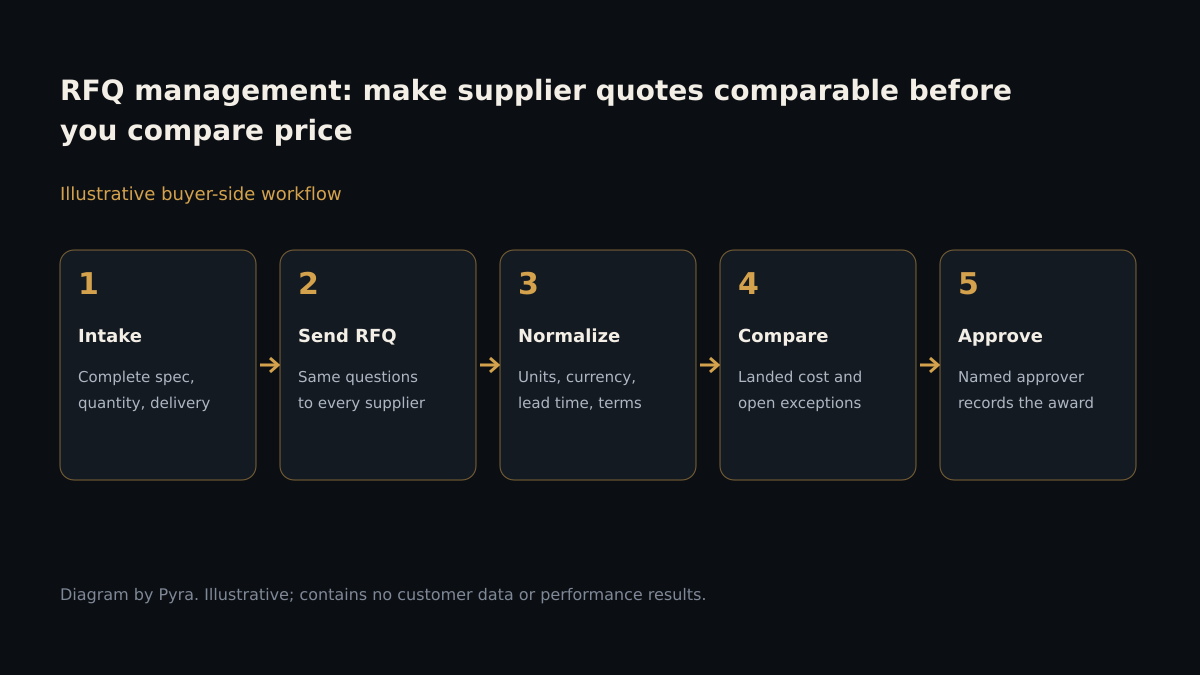
RFQ management software helps a buyer collect, compare and approve supplier quotes for a defined purchase. A request for quotation asks suppliers to price the same, fully specified need, so its value comes from complete intake, identical questions, normalized answers and a recorded approval. This guide is for the buyer side and includes a bid-comparison worksheet you can use in a spreadsheet today, whatever software you choose.
An RFQ is narrower than an RFP. You already know what you want to buy and need prices and terms for it. An RFP asks suppliers to propose solutions. If you are a supplier answering requests for proposal, see our AI RFP writer guide; this page is for the person who sends the request and has to compare what comes back.
Why comparisons go wrong without RFQ management software
Most bad RFQ decisions start before any quote arrives. A vague specification invites suppliers to quote different things. Different units, currencies, incoterms and lead times then make the lowest number look cheaper than it is. RFQ management software should reduce those problems by forcing structure at intake and at comparison, not just by storing emails.
RFQ management software starts with intake completeness
Before sending anything, require these fields. If a field is unknown, record the assumption and let suppliers quote against it.
- Item description, drawing or specification reference, and acceptable alternates.
- Quantity, unit of measure and whether the quantity is firm or an estimate.
- Delivery location, required date and whether partial shipments are acceptable.
- Quality, certification and inspection requirements.
- Commercial terms you require: payment terms, warranty, validity period of the quote.
- Response deadline and the single contact for questions.
Send the same package and answer supplier questions to everyone, so no one bids on private information.
Bid-comparison worksheet
Normalize every quote into one row before comparing. The numbers below are synthetic and exist only to show the arithmetic.
Bid-comparison worksheet with synthetic example values (all prices in USD after conversion)
| Line | Supplier A | Supplier B | Supplier C |
|---|---|---|---|
| Quoted unit price | $10.00 per unit | EUR 8.80 per 100 g pack | $9.40 per unit |
| Unit normalized to your unit | 1 unit | Pack is not your unit: convert, then confirm with supplier | 1 unit |
| Currency and rate used (state the date) | USD | EUR to USD at the rate you record | USD |
| Freight and duties | Included | Excluded: add estimate | Excluded: add estimate |
| Lead time | 4 weeks | 6 weeks | 3 weeks |
| Payment terms | Net 30 | Net 60 | Prepay |
| Quote valid until | 2026-12-15 | 2026-12-01 | Not stated: ask |
| Landed cost per unit (your calculation) | Calculate | Calculate | Calculate |
| Open exceptions | None | Requested alternate material | Minimum order above your quantity |
Landed cost = price per your unit + freight, duties and other charges allocated per unit. Fill the cell only once units and charges are confirmed.
Handle exceptions in the open
Suppliers will propose alternates, minimum quantities and different terms. Record each as an exception with an owner and a decision, and do not let it silently remove a supplier or lower a price. If an alternate would change the specification, send the same alternate option to every supplier so the comparison stays fair.
Approval and records in RFQ management software
Name the approver before the RFQ goes out, with a threshold if purchase value changes who approves. When the award is made, store the normalized worksheet, the reason for the decision and who approved it. Auditors and your own team will ask later why a higher quote won, and the reason is often lead time, risk or quality, which a price column alone cannot show.
What to ask RFQ management software vendors
- Can I define required fields so an incomplete request cannot be sent?
- Does every supplier receive identical questions, with answers shared to all?
- Does it convert units and currencies, and does it record the rate and date used?
- Can I see the comparison with exceptions and landed cost, not only unit price?
- Is there an approval step with a log of who decided, and can I export the record?
- Which of my purchasing or ERP systems does it read from or write to, per the vendor's documentation?
Pyra's RFP / RFQ response agent is described by Pyra as a tool for responding to incoming requests. It is a supplier-side response tool, not a buyer-side RFQ management system, so do not choose it for the job in this article.
Questions readers ask
What does RFQ management software do?
It collects supplier quotes against one specification, helps normalize units, currency, lead time and terms for comparison, and records the approval decision.
What is the difference between an RFQ and an RFP?
An RFQ asks for prices and terms for a defined purchase. An RFP asks suppliers to propose how they would solve a problem, so answers vary much more.
Should the lowest quote always win?
No. Compare landed cost, lead time, quality requirements, payment terms and open exceptions, then record why the winner was chosen.
Can a spreadsheet replace RFQ management software?
For a few quotes, yes, if you use a structured worksheet. Software helps when volume, approvals or audit needs grow.
Sources
- Pyra RFP / RFQ response agent describes a response-side agent for incoming requests, not buyer-side RFQ management. Read Nov 23, 2026.
About the author
Bob Generale is COO and co-founder of Pyra, with 20+ years of Fortune 500 operations experience. This guide explains how to make supplier quotes comparable before comparing price. The worksheet is a template with invented numbers, and no RFQ product was tested for this article.
Use the worksheet on your next RFQ
Copy the worksheet into a spreadsheet, fill it for your next purchase, and use the vendor questions above to judge any software you consider.
Read the AI RFP writer guide