Best Marketing Operations Tools in 2026: 8 Compared on Handoffs, Governance and Price
Asana, monday.com, Wrike, Adobe Workfront, Smartsheet, ClickUp, Airtable and HubSpot Data Hub compared on nine criteria with published pricing, so you can choose the tool that owns your first broken handoff. Reviewed Nov 8, 2026.
Short answer: the best marketing operations tools depend on which handoff breaks first. Asana, monday.com and Wrike suit campaign planning and approvals with published prices; Adobe Workfront suits Adobe-centred enterprises but publishes no price; Smartsheet, ClickUp and Airtable suit teams that build their own structure; HubSpot Data Hub cleans CRM data. Eight options were reviewed on November 8, 2026.
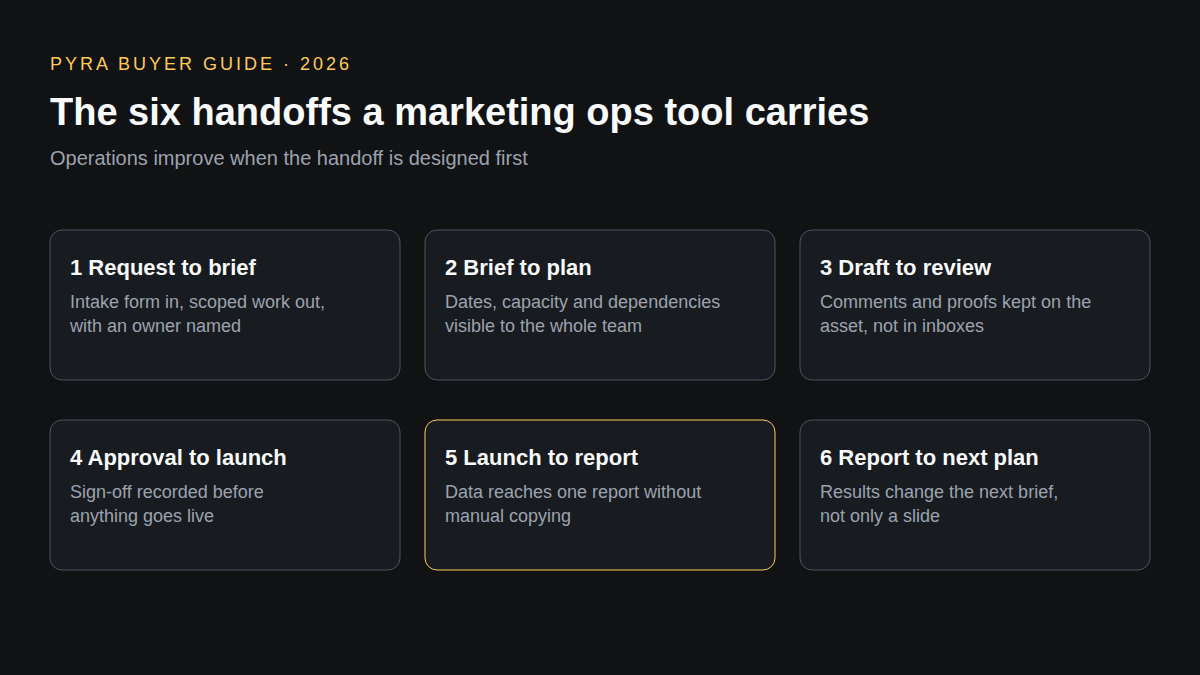
Operations improve when the handoff is designed first. This guide is for marketing leaders and ops managers choosing the system that carries work from request to report. Several results for the best marketing operations tools 2025 are last year's lists, so every price and feature here comes from a vendor page reviewed on November 8, 2026. These tools run internal work and data; they do not find buyers or show how AI engines describe you. Bob Generale, who wrote this guide, is co-founder of Pyra, which makes Prime and Lead Seeker covered later, and President of Percepture. "Not described" means the pages reviewed did not say, not that the feature is absent.
How the best marketing operations tools were compared
The same nine criteria were applied to every option, using only its public product and pricing pages. The results for this query are mostly vendor-written and commissioned lists of ten, so each claim below is tied to the vendor's own page. The profile order is editorial judgement of fit for B2B marketing teams, not a score, and no hands-on test was run. Prices are the figures displayed on that date and differ by billing term.
| Criterion | The question it answers |
|---|---|
| Use-case fit | Is the product aimed at marketing work, or does it need adapting? |
| Workflow depth | Does it carry intake, planning, review and launch handoffs, not only a task list? |
| Collaboration | Can agencies, freelancers and stakeholders take part, and at what seat cost? |
| Analytics and measurement | Can you see workload, progress and results without rebuilding them elsewhere? |
| AI assistance | What does the vendor say its AI does, and who approves it? |
| Integrations | Does it connect to the CRM, content and reporting tools you already run? |
| Brand governance | Are permissions, approvals and audit trails described? |
| Pricing | Is the price on the public page, and what is it per seat or month? |
| Time to value | Can a team test it on a real brief before buying? |
Best marketing operations tools compared
Two tables, the same eight tools in profile order. The first covers fit, workflow, collaboration, analytics and AI; the second covers integrations, governance, price and time to value. Scroll sideways on small screens.
| Tool | Kind | Use-case fit | Workflow depth | Collaboration | Analytics | AI assistance |
|---|---|---|---|---|---|---|
| Asana | Work management | Its marketing page lists campaign management, creative production, content planning and launches and events | Forms turn requests into tasks and custom templates standardize projects from Starter; timeline and Gantt views from Starter; approvals and proofing from Advanced | Unlimited free guests from Starter; resource management from Advanced; capacity planning in Enterprise | Reporting dashboards from Starter; goals from Advanced; Salesforce, Tableau and Power BI connections from Advanced | AI Teammates, an AI chief of staff called Asana Dash and AI Studio are listed as included on paid plans; the marketing page names Campaign Coordinator, Content Strategist and Launch Coordinator teammates |
| monday.com | Work management | Its marketing page names campaign planning, content creation, performance reporting, asset production, campaign briefs and brand management among the work its agents can handle | Basic adds unlimited items; Standard adds 3 workflows, timeline, Gantt and calendar views, and guest access; Pro adds 20 workflows, private boards and time tracking | Up to 2 seats free; unlimited free read-only viewers from Basic; guest access from Standard | Advanced board views (charts and graphs) from Pro; portfolio and resource management in Enterprise | AI credits on every paid plan (1,000, 2,000 and 3,000 a month on Basic, Standard and Pro), with Sidekick, an AI agent workforce and AI columns; Enterprise adds an AI workflow builder |
| Wrike | Work management | Its marketing page lists requests, proofing, timelines and calendars, resources, whiteboard, dashboards and dynamic request forms | Request forms create the project, assign people and generate the creative brief; custom fields and workflows from Team; templates and workflow customization from Business | Review and approval with comments kept on the file; Team covers 2 to 15 users and Business 5 to 200 users | Shareable dashboard and Gantt charts from Team; advanced reporting and BI in Pinnacle | AI Essentials from Team and AI Elite from Business, plus Copilot, AI agents, AI insights and an MCP server named on the pricing page |
| Adobe Workfront | Enterprise work management | Adobe frames it as work management across the marketing lifecycle, with campaign planning and agency client work among its listed use cases | Intake, resourcing and tracking, planning (including an Ideation Space that carries campaign ideas into a plan), automation, and review and approval are listed | Cross-team collaboration and simplified review and approval cycles; capacity and resource balancing across teams | Visibility and insights are listed as a feature area; report detail is not described on the pages reviewed | AI Collaborators, which accept assigned work from Adobe, custom or third-party agents, with human approval built in by default, and a Workfront MCP |
| Smartsheet | Spreadsheet-style work management | Programs and project tracking with forms, reports and dashboards; marketing-specific features are not described on the pricing page | Pro includes Gantt, table, board and calendar views, forms, reports and 250 automations a month; Business adds timeline view, workload tracking and unlimited automations | Unlimited free contributors; unlimited free guests from Business | Unlimited reports and AI-powered dashboards on Pro; Enterprise adds portfolios and scenario planning | Smart Assist, Smart Columns and AI-powered dashboards on Pro; Business connects to external AI tools through MCP-enabled integrations |
| ClickUp | All-in-one work management | General work management; marketing-specific features are not described on the pricing page | Core adds custom fields, unlimited forms and Gantt charts; Business adds advanced dashboards, resource management, timesheets and private views | Unlimited free members; guest permissions from Core | Advanced dashboards and time-in-status reports from Business | ClickUp Brain credits that rise by plan; Autopilot agents, MCP connections and custom skills in the Max plan |
| Airtable | Database-style app builder | Its pricing page describes building apps for shared workflows; marketing templates were not reviewed | Free includes Interface Designer and 100 automation runs; Team adds 25,000 runs, Gantt and timeline views; Business adds verified data and two-way sync | Up to 5 editors free; Portals for external guests are an add-on from $120 for 15 guests a month | Roadmap view and Exec Summary cards from Business; reporting beyond that is not described | AI credits per user (500 per editor on Free, 15,000 on Team, 20,000 on Business); AI admin controls from Business |
| HubSpot Data Hub | Customer-data operations | Data sync, custom field mappings, enrichment and data quality for teams on HubSpot; it is not a project-planning tool | Starter syncs data and maps custom fields; Professional adds data quality automation, bulk duplicate management and programmable automation | Not described; Professional and Enterprise include 1 Core Seat with additional seats priced separately | A data quality overview (beta) in Professional; Enterprise adds data warehouse integrations | AI-powered data formatting recommendations in Starter; Agent Hub in Professional; HubSpot Credits power AI features |
| Tool | Integrations | Brand governance | Pricing | Time to value |
|---|---|---|---|---|
| Asana | 100+ free integrations are listed on the free plan; Salesforce, Tableau and Power BI from Advanced | Scaled security from Advanced; SAML and SCIM in Enterprise; audit logs and data residency in Enterprise+; brand-voice or asset governance is not described | Personal $0 for 2 users; Starter $10.99 and Advanced $24.99 per user a month billed annually; Enterprise by quote (asana.com/pricing, Nov 8, 2026) | A free plan and self-serve sign-up; the marketing page links template starting points |
| monday.com | 250 automation and 250 integration actions a month on Standard, 25,000 on Pro, up to 250,000 in Enterprise; API calls from 1,000 a day | Private boards and docs from Pro; enterprise-grade security, governance and multi-level permissions in Enterprise | Free $0 for 2 seats; Basic $9, Standard $12 and Pro $19 per seat a month billed annually at the 10-seat view; Enterprise by quote (monday.com/pricing, Nov 8, 2026) | A free-forever plan with 200+ templates and no card needed |
| Wrike | Standard integrations from Business; Wrike Integrate, Two-Way Sync (22 integrated systems) and Datahub are add-ons or included in Apex | SSO and advanced security and compliance in Pinnacle; Wrike Lock, for your own encryption keys, is an add-on | Free $0; Team $10 and Business $25 per user a month billed annually (valid for new purchases on or after January 21, 2026); Pinnacle and Apex by quote (wrike.com/price, Nov 8, 2026) | A free plan and a trial of Team and Business without a card |
| Adobe Workfront | Adobe Express, Experience Manager, Frame.io, Creative Cloud for enterprise, GenStudio for Performance Marketing and Workfront Fusion | AI actions follow existing permissions and roles and are logged and auditable; Express and Content Reviewer add brand-compliance review | Select, Prime and Ultimate packages with add-ons; each shows "Get pricing" and no price is published (business.adobe.com, Nov 8, 2026) | A tour and a sales conversation; a self-serve trial is not described |
| Smartsheet | Directory integrations in Enterprise; Data Shuttle, Connectors and DataMesh in the top tier | Admin Center from Business; SAML-based SSO in Enterprise; Dynamic View sharing controls in the top tier | Pro $9 and Business $19 per member a month billed yearly ($12 and $24 billed monthly); Enterprise and Advanced Work Management by quote (smartsheet.com/pricing, Nov 8, 2026) | A "Start now" sign-up on Pro and Business |
| ClickUp | Google Drive, Dropbox and Box from Core; webhooks and automation integrations from Business; Enterprise API | Google SSO from Business; SAML, SCIM, audit logs, white labeling and custom roles in Enterprise | Free $0; Core $9 and Business $17 per user a month as displayed (confirm the billing term before comparing costs); Enterprise by quote; Max $100 per user billed yearly (clickup.com/pricing, Nov 8, 2026) | A free forever plan with tasks, docs and one form |
| Airtable | Standard sync on Team, premium sync and two-way sync on Business, Enterprise Scale integrations and an Enterprise API | Admin panel and SAML SSO on Business; audit logs and DLP in Enterprise Scale | Free $0; Team $20 ($24 monthly) and Business $45 ($54 monthly) per seat a month billed annually; Enterprise Scale by quote (airtable.com/pricing, Nov 8, 2026) | A free plan; value depends on building your own structure |
| HubSpot Data Hub | Data sync between HubSpot and third-party apps from the free plan; data warehouse integrations in Enterprise | Standard sandbox and custom objects in Enterprise; brand governance is not described | Free for up to 2 users; Starter from $7 per seat a month (the page also shows $20); Professional from $720 a month; Enterprise from $2,000 a month; additional Core Seats $45 and $75 a month (hubspot.com/pricing/operations, Nov 8, 2026) | A free plan and a 14-day trial of Professional and Enterprise |
Profiles
1. Work management
Asana
Best fit: Marketing teams that want campaign, content and launch work in one planning system with approvals and guests.
Workflow: Forms turn requests into tasks and custom templates standardize projects from Starter; timeline and Gantt views from Starter; approvals and proofing from Advanced. Collaboration: Unlimited free guests from Starter; resource management from Advanced; capacity planning in Enterprise.
Analytics: Reporting dashboards from Starter; goals from Advanced; Salesforce, Tableau and Power BI connections from Advanced. AI: AI Teammates, an AI chief of staff called Asana Dash and AI Studio are listed as included on paid plans; the marketing page names Campaign Coordinator, Content Strategist and Launch Coordinator teammates.
Integrations: 100+ free integrations are listed on the free plan; Salesforce, Tableau and Power BI from Advanced. Governance: Scaled security from Advanced; SAML and SCIM in Enterprise; audit logs and data residency in Enterprise+; brand-voice or asset governance is not described.
Pricing: Personal $0 for 2 users; Starter $10.99 and Advanced $24.99 per user a month billed annually; Enterprise by quote (asana.com/pricing, Nov 8, 2026). Time to value: A free plan and self-serve sign-up; the marketing page links template starting points.
Strength: Request forms, templates, approvals and guests sit in the same plan ladder, with prices published up to Advanced.
Limitation: Approvals and proofing, goals and resource management are in the Advanced plan, and Enterprise is quote-only.
What to verify: Which plan your review and approval flow needs, and how many agency or freelance guests you will invite.
Source: Asana pricing and marketing pages (reviewed November 8, 2026).
2. Work management
monday.com
Best fit: Teams that want configurable boards, automations and workflows with a free start for two seats.
Workflow: Basic adds unlimited items; Standard adds 3 workflows, timeline, Gantt and calendar views, and guest access; Pro adds 20 workflows, private boards and time tracking. Collaboration: Up to 2 seats free; unlimited free read-only viewers from Basic; guest access from Standard.
Analytics: Advanced board views (charts and graphs) from Pro; portfolio and resource management in Enterprise. AI: AI credits on every paid plan (1,000, 2,000 and 3,000 a month on Basic, Standard and Pro), with Sidekick, an AI agent workforce and AI columns; Enterprise adds an AI workflow builder.
Integrations: 250 automation and 250 integration actions a month on Standard, 25,000 on Pro, up to 250,000 in Enterprise; API calls from 1,000 a day. Governance: Private boards and docs from Pro; enterprise-grade security, governance and multi-level permissions in Enterprise.
Pricing: Free $0 for 2 seats; Basic $9, Standard $12 and Pro $19 per seat a month billed annually at the 10-seat view; Enterprise by quote (monday.com/pricing, Nov 8, 2026). Time to value: A free-forever plan with 200+ templates and no card needed.
Strength: A free start, 200+ templates and published prices up to Pro, with automation and integration allowances that scale by plan.
Limitation: Approvals and proofing are not described on the pricing page, and portfolio and resource management are Enterprise-only.
What to verify: How many automation and AI credits your volume uses, and whether your review process fits boards without a dedicated proofing feature.
Source: monday.com pricing and marketing pages (reviewed November 8, 2026).
3. Work management
Wrike
Best fit: Marketing and creative teams that want request forms, proofing and dashboards in a dedicated platform.
Workflow: Request forms create the project, assign people and generate the creative brief; custom fields and workflows from Team; templates and workflow customization from Business. Collaboration: Review and approval with comments kept on the file; Team covers 2 to 15 users and Business 5 to 200 users.
Analytics: Shareable dashboard and Gantt charts from Team; advanced reporting and BI in Pinnacle. AI: AI Essentials from Team and AI Elite from Business, plus Copilot, AI agents, AI insights and an MCP server named on the pricing page.
Integrations: Standard integrations from Business; Wrike Integrate, Two-Way Sync (22 integrated systems) and Datahub are add-ons or included in Apex. Governance: SSO and advanced security and compliance in Pinnacle; Wrike Lock, for your own encryption keys, is an add-on.
Pricing: Free $0; Team $10 and Business $25 per user a month billed annually (valid for new purchases on or after January 21, 2026); Pinnacle and Apex by quote (wrike.com/price, Nov 8, 2026). Time to value: A free plan and a trial of Team and Business without a card.
Strength: Intake forms that generate the brief and proofing that keeps comments on the asset are described on its marketing page.
Limitation: Reporting and BI, SSO and budgeting are in quote-only plans, and Whiteboard, Integrate and Sync are priced separately.
What to verify: Whether your integrations need an add-on and whether Business covers your approval and capacity needs.
Source: Wrike pricing and marketing features pages (reviewed November 8, 2026).
4. Enterprise work management
Adobe Workfront
Best fit: Larger marketing organizations that want a marketing system of record connected to Adobe's content tools.
Workflow: Intake, resourcing and tracking, planning (including an Ideation Space that carries campaign ideas into a plan), automation, and review and approval are listed. Collaboration: Cross-team collaboration and simplified review and approval cycles; capacity and resource balancing across teams.
Analytics: Visibility and insights are listed as a feature area; report detail is not described on the pages reviewed. AI: AI Collaborators, which accept assigned work from Adobe, custom or third-party agents, with human approval built in by default, and a Workfront MCP.
Integrations: Adobe Express, Experience Manager, Frame.io, Creative Cloud for enterprise, GenStudio for Performance Marketing and Workfront Fusion. Governance: AI actions follow existing permissions and roles and are logged and auditable; Express and Content Reviewer add brand-compliance review.
Pricing: Select, Prime and Ultimate packages with add-ons; each shows "Get pricing" and no price is published (business.adobe.com, Nov 8, 2026). Time to value: A tour and a sales conversation; a self-serve trial is not described.
Strength: Governed AI participation with an audit trail, and links to Adobe content tools for brand review.
Limitation: No published price, and the integrations that matter most are Adobe's own.
What to verify: The package price at your user count, which add-ons you need and what connects to the non-Adobe tools you already run.
Source: Adobe Workfront overview and pricing pages (reviewed November 8, 2026).
5. Spreadsheet-style work management
Smartsheet
Best fit: Teams that think in sheets, forms and reports and want guests and contributors at no extra seat cost.
Workflow: Pro includes Gantt, table, board and calendar views, forms, reports and 250 automations a month; Business adds timeline view, workload tracking and unlimited automations. Collaboration: Unlimited free contributors; unlimited free guests from Business.
Analytics: Unlimited reports and AI-powered dashboards on Pro; Enterprise adds portfolios and scenario planning. AI: Smart Assist, Smart Columns and AI-powered dashboards on Pro; Business connects to external AI tools through MCP-enabled integrations.
Integrations: Directory integrations in Enterprise; Data Shuttle, Connectors and DataMesh in the top tier. Governance: Admin Center from Business; SAML-based SSO in Enterprise; Dynamic View sharing controls in the top tier.
Pricing: Pro $9 and Business $19 per member a month billed yearly ($12 and $24 billed monthly); Enterprise and Advanced Work Management by quote (smartsheet.com/pricing, Nov 8, 2026). Time to value: A "Start now" sign-up on Pro and Business.
Strength: Free contributors and guests, with unlimited forms, sheets and reports on the entry plan.
Limitation: Marketing workflows (proofing, briefs) are not described on the pricing page, and Pro covers 1 to 10 members.
What to verify: Whether sheet-based planning fits how your marketers work, and how many full members versus contributors you need.
Source: Smartsheet pricing page (reviewed November 8, 2026).
6. All-in-one work management
ClickUp
Best fit: Teams that want tasks, docs, forms, dashboards and AI in one low-priced workspace.
Workflow: Core adds custom fields, unlimited forms and Gantt charts; Business adds advanced dashboards, resource management, timesheets and private views. Collaboration: Unlimited free members; guest permissions from Core.
Analytics: Advanced dashboards and time-in-status reports from Business. AI: ClickUp Brain credits that rise by plan; Autopilot agents, MCP connections and custom skills in the Max plan.
Integrations: Google Drive, Dropbox and Box from Core; webhooks and automation integrations from Business; Enterprise API. Governance: Google SSO from Business; SAML, SCIM, audit logs, white labeling and custom roles in Enterprise.
Pricing: Free $0; Core $9 and Business $17 per user a month as displayed (confirm the billing term before comparing costs); Enterprise by quote; Max $100 per user billed yearly (clickup.com/pricing, Nov 8, 2026). Time to value: A free forever plan with tasks, docs and one form.
Strength: Low displayed prices, unlimited free members and forms from Core.
Limitation: The free plan has 60 MB storage and one form, and brand and approval controls are not described.
What to verify: Whether the displayed price is annual or monthly and how AI credits pool across your users.
Source: ClickUp pricing page (reviewed November 8, 2026).
7. Database-style app builder
Airtable
Best fit: Operations teams that want to build a custom marketing database, such as a content or asset tracker, with interfaces and syncs.
Workflow: Free includes Interface Designer and 100 automation runs; Team adds 25,000 runs, Gantt and timeline views; Business adds verified data and two-way sync. Collaboration: Up to 5 editors free; Portals for external guests are an add-on from $120 for 15 guests a month.
Analytics: Roadmap view and Exec Summary cards from Business; reporting beyond that is not described. AI: AI credits per user (500 per editor on Free, 15,000 on Team, 20,000 on Business); AI admin controls from Business.
Integrations: Standard sync on Team, premium sync and two-way sync on Business, Enterprise Scale integrations and an Enterprise API. Governance: Admin panel and SAML SSO on Business; audit logs and DLP in Enterprise Scale.
Pricing: Free $0; Team $20 ($24 monthly) and Business $45 ($54 monthly) per seat a month billed annually; Enterprise Scale by quote (airtable.com/pricing, Nov 8, 2026). Time to value: A free plan; value depends on building your own structure.
Strength: A flexible base for custom marketing data, with two-way sync and verified data on Business.
Limitation: Record limits per base (1,000 on Free, 50,000 on Team), and the team builds its own workflow.
What to verify: Whether your record counts fit the plan and who will own the base design.
Source: Airtable pricing page (reviewed November 8, 2026).
8. Customer-data operations
HubSpot Data Hub
Best fit: HubSpot teams that need to sync, clean and enrich contact and company data and automate processes across systems.
Workflow: Starter syncs data and maps custom fields; Professional adds data quality automation, bulk duplicate management and programmable automation. Collaboration: Not described; Professional and Enterprise include 1 Core Seat with additional seats priced separately.
Analytics: A data quality overview (beta) in Professional; Enterprise adds data warehouse integrations. AI: AI-powered data formatting recommendations in Starter; Agent Hub in Professional; HubSpot Credits power AI features.
Integrations: Data sync between HubSpot and third-party apps from the free plan; data warehouse integrations in Enterprise. Governance: Standard sandbox and custom objects in Enterprise; brand governance is not described.
Pricing: Free for up to 2 users; Starter from $7 per seat a month (the page also shows $20); Professional from $720 a month; Enterprise from $2,000 a month; additional Core Seats $45 and $75 a month (hubspot.com/pricing/operations, Nov 8, 2026). Time to value: A free plan and a 14-day trial of Professional and Enterprise.
Strength: Data cleaning and sync tied to the CRM, with a free tier and published prices for all three paid tiers.
Limitation: It does not plan or approve creative work, and the paid tiers are priced by month or seat with credits on top.
What to verify: That the data you need cleaned sits in HubSpot, and the credit use of the AI features you plan to turn on.
Source: HubSpot Data Hub pricing page (reviewed November 8, 2026).
What has to happen before the work starts
A marketing operations tool organizes work once you know what to make and for whom. The demand journey starts earlier: build visibility, identify buyer-fit accounts, then translate signals into action. Buyers now ask ChatGPT, Perplexity, Gemini and Google's AI answers who to consider, and Prime AI Visibility, a Pyra product, shows what those engines name and cite for your buyers' questions; it does not monitor Google organic rankings. Its guide to choosing an AI visibility tool scores six axes (engines covered, refresh cadence, prompt ownership, metric definitions, raw-data export and pricing) and recommends a trial with your own ten buyer prompts, the same test this guide suggests for a work tool.
Next comes deciding which accounts the campaigns serve. Pyra's product page describes Lead Seeker, and Lead Seeker handles B2B prospecting, verified contacts and buyer dossiers; it does not track AI answers. When intent signals have to become qualified account selection, campaign execution or sales activation, Percepture's B2B intent data services connect them to the campaign. These are separate tools and services, not one product, and none replaces the work system chosen above.
To see which marketing tasks AI agents can take on with human approval, read our guide to AI agents for marketing teams. For the channel platforms that send the campaigns these tools plan, see our omnichannel marketing tools comparison, and Pyra works across the visibility, account and signal steps.
Best marketing operations tools: questions buyers ask
What counts as a marketing operations tool?
Software that moves marketing work between people and systems: intake and briefs, planning and capacity, review and approval, launch, and reporting. The tools here fall into three kinds. Work management tools such as Asana, monday.com, Wrike, Adobe Workfront, Smartsheet and ClickUp run the work; Airtable is a database you build on; HubSpot Data Hub cleans and syncs the customer data under it.
How much do marketing operations tools cost?
On the vendor pages reviewed on November 8, 2026, paid self-serve plans started at $9 to $20 per user a month on annual billing and topped out at $19 to $45 before the quote-only tiers: Asana $10.99 to $24.99, monday.com $9 to $19, Wrike $10 to $25, Smartsheet $9 to $19 and Airtable $20 to $45. Asana, monday.com, Wrike and Airtable also have a free plan. Adobe Workfront publishes no price, and enterprise tiers across the set are by quote. HubSpot Data Hub is priced per seat on Starter and by month from Professional.
Do I need one marketing operations tool or several?
Often two: one for the work and one for the data. A planning tool does not clean CRM records, and a data tool does not run approvals. Start from the handoff that breaks most often today, pick the tool that owns it, and add a second only when a handoff still lives in email or spreadsheets.
How should I trial a marketing operations tool?
Run one real campaign brief through it, from request form to approval to report, with the people who will use it, including an outside guest. Check who is named as owner at each handoff, where comments and approvals are kept, and whether the report needs manual copying. Several tools here offer a free plan or trial for that test.
Does a marketing operations tool track AI search visibility?
Not as described on the pages reviewed. Work management and data tools run internal work; whether ChatGPT, Perplexity or Gemini names and cites your brand is a separate measurement, covered by AI visibility tools.
Sources
Vendor pages are linked from each profile and were reviewed November 8, 2026. Written by Bob Generale, COO and co-founder of Pyra and President of Percepture; reviewed by Alex Mannine.
Plan your marketing operations stack with Pyra
Talk with Pyra about the handoffs to fix first, the work tool to pick and the visibility, account and signal inputs that feed it.