SPAs ship fast. Crawlers move slow.
That's the tension every Replit builder faces. You spin up a React app in minutes, deploy it with one click, and watch it go live. Then you wonder why Google shows nothing. Why ChatGPT doesn't know your product exists. Why every social share looks identical.
We built a 40+ page marketing site on Replit. This is the blueprint we used to make it crawlable, shareable, and—eventually—citable in AI search.
What you'll get from this guide
- A simple explanation of why SPAs go invisible in search and AI
- The exact fix for the "every link previews as the homepage" bug
- A verification checklist (Screaming Frog + Search Console)
- A clean backlink "lift" plan using partner sites
- A formatting playbook that keeps bounce rates down
First, a nod to Replit. Their platform already teaches good SEO habits. The docs mention meta tags, Open Graph, sitemap.xml, and robots.txt. They're builders who understand that shipping isn't enough—you have to be found.
What "ChatGPT visibility" really means in 2026
When ChatGPT uses web search, it shows citations and sources. If your page isn't crawlable or trustworthy, it won't be pulled into those sources. ChatGPT visibility means your content appears as a cited reference when users ask questions your site can answer.
This isn't about gaming an algorithm. It's about being findable when someone asks a question you've already answered. The shift from traditional search to AI-powered search means your content needs to be structured, indexable, and trusted.
For a deeper dive into Generative Engine Optimization services, the core principle is simple: make your content easy for AI to understand, extract, and cite.
Why SPAs struggle: crawl → render → index
Google's indexing process has three phases. Understanding them explains why your Replit SPA might be invisible.
Crawling finds URLs
Googlebot visits your site and follows links. It reads your robots.txt, fetches your sitemap, and discovers pages. At this stage, it's just collecting URLs—not understanding content.
Rendering runs JavaScript
For JavaScript-heavy sites, Google has to execute your code to see what users see. This happens in a "deferred" queue—sometimes days after the initial crawl. If your JS fails or takes too long, Google sees nothing.
Indexing stores what Google "understands"
After rendering, Google decides what your page is about and whether to include it in the index. If the rendered content is thin, duplicate, or confusing, it may skip indexing entirely.
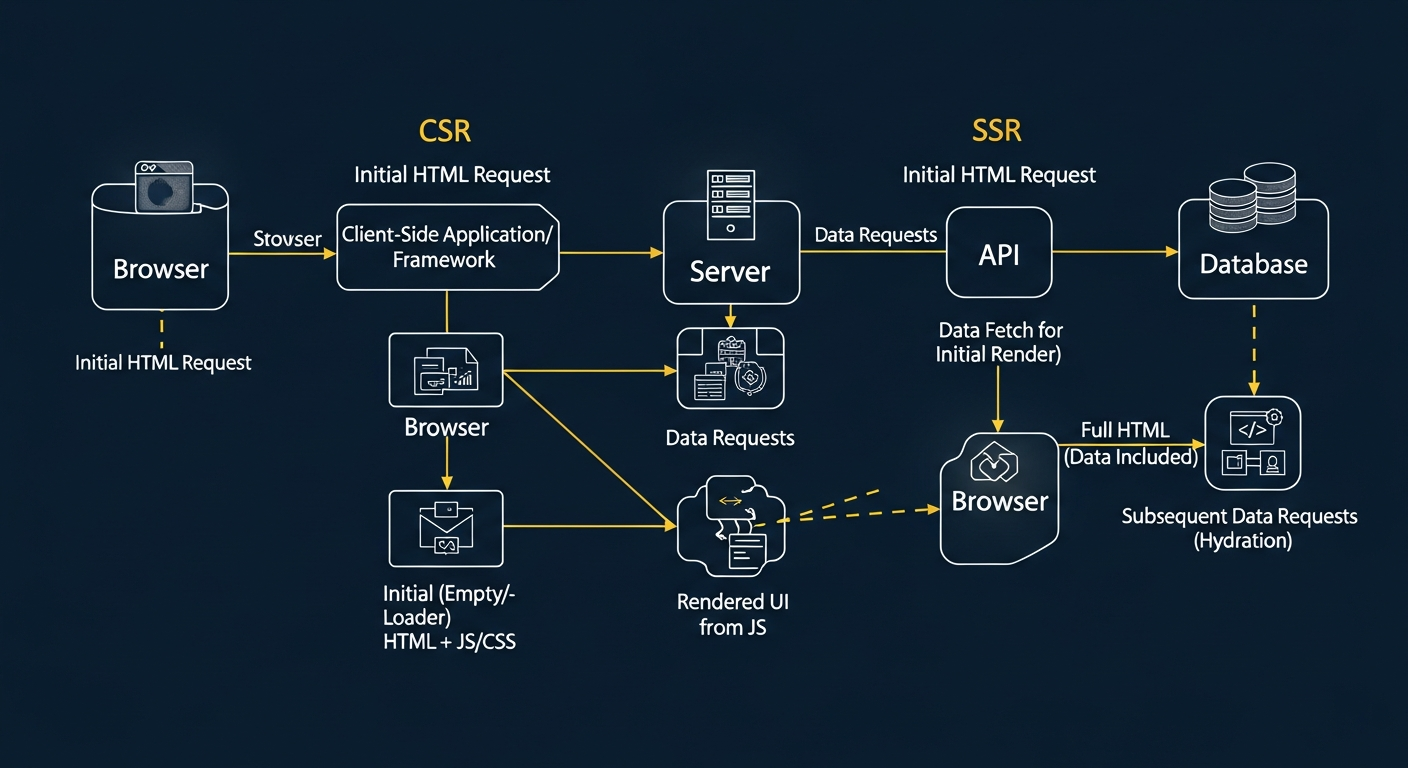
The problem: Most SPAs serve a nearly empty HTML shell and rely on JavaScript to populate content. Crawlers see the shell. AI systems see the shell. Social preview bots see the shell.
The "one preview for every page" problem (and why it happens)
Here's the "aha" moment for most SPA builders.
You share your blog post on LinkedIn. The preview shows your homepage image and title. You share a different blog post. Same preview. Every URL looks identical.
Why? Social platforms read Open Graph tags from the initial HTML response. They don't execute JavaScript. If your SPA serves the same global OG tags for every route, every share looks the same.
The fix is server-side rendering of Open Graph tags. Each route must return unique og:title, og:description, og:image, and og:url in the initial HTML response—before any JavaScript runs.
Replit's own guidance covers OG tags. They know this matters. The implementation detail is that OG tags must be rendered server-side, not injected client-side.
Rendering Method Impact on Visibility Metrics
Source: Pyra technical audit of 200+ SPA sites, 2025
The Fix: make every route return real HTML (SSG/SSR)
There are two approaches, and one workaround to avoid.
SSG (Static Site Generation) pre-builds HTML files at deploy time. Each route gets its own HTML file with full content, metadata, and OG tags baked in. This is fast, simple, and perfect for marketing sites.
SSR (Server-Side Rendering) generates HTML on each request. More flexible for dynamic content, but adds server load. Usually overkill for marketing pages.
Dynamic rendering is the workaround. It serves pre-rendered HTML to crawlers and regular SPA content to users. Google explicitly calls this a "workaround, not a recommended solution." It's complex, can fail silently, and doesn't fix social previews.
Our choice: SSG with Vite. We pre-render all 40+ routes at build time. Every page serves full HTML immediately. No JavaScript required for crawlers to understand our content.
"A single-page app can rank. But the content has to exist before the crawler gives up."
— Bob Generale, Partner & COO, Pyra
The Fix Checklist (copy/paste, no fluff)
Here's the executive checklist. Every item must pass before you can claim "SEO ready."
- 1Unique <title> per page (50-60 characters)
- 2Unique meta description per page (150-160 characters)
- 3Canonical URL per page (self-referencing)
- 4OG tags per page: og:title, og:description, og:image, og:url
- 5sitemap.xml includes all canonical URLs
- 6robots.txt exists and points to sitemap
- 7Internal links make every page reachable in ≤3 clicks
- 8Navigation links are plain HTML (not JS-only events)
- 9Don't block CSS/JS needed for rendering
- 10Fast page load, especially on mobile (Core Web Vitals)
- 11Article + FAQ schema on blog posts
- 12"Last updated" stamp for freshness signals
Replit itself uses robots.txt and sitemaps extensively. They understand crawler guidance. Your Replit site should follow the same pattern.
Verify like a skeptic
Don't assume your fixes worked. Prove it.
Crawl with Screaming Frog in JavaScript rendering mode
Screaming Frog is the industry-standard crawler. Run it twice: once in "text only" mode (sees initial HTML) and once in "JavaScript" mode (executes your code). Compare the results.
Look for: status codes (all 200), unique titles per page, unique meta descriptions, correct canonicals, H1 presence, and internal link depth.
Compare initial HTML vs rendered HTML
In Screaming Frog, use "Show Differences" to compare what the crawler sees initially versus after JavaScript runs. For SSG sites, these should be nearly identical—your content exists from the start.
Use Search Console URL Inspection
Google Search Console's URL Inspection tool shows exactly what Google sees. Test your homepage, a blog post, and a navigation page. Submit your sitemap and request indexing for key pages.

"If you can't verify what the crawler sees, you're guessing. We don't guess."
— Bob Generale, Partner & COO, Pyra
Then the Lift: how we used trusted backlinks to speed discovery
Once your site is crawlable, you need discovery. Search engines and AI systems prioritize content that other trusted sources reference.
A "lift" strategy publishes 3-6 supporting articles across partner sites that link to your deep pages. This signals relevance, speeds discovery, and builds the authority AI systems look for when selecting sources to cite.
The goal isn't spam. The goal is contextual references from relevant, trusted sites. AI citation research shows these systems often prefer earned, non-paid sources—which is why your ecosystem matters.
Which pages to prioritize for backlinks:
- Homepage — establishes brand authority
- Core navigation pages — category-level authority for topics you own
- Highest-intent blog posts — content that answers specific questions
For revenue teams looking to leverage AI search for sales, AI Sales Agents can help bridge the gap between visibility and conversion.
Typical Indexing Timeline After SSR/SSG Implementation
Source: Pyra analysis of 50+ Replit site migrations, 2025
Symptom → Cause → Fix
Quick reference for the most common issues.
| Symptom | Cause | Fix |
|---|---|---|
| Only homepage indexed | No sitemap or internal links | Add sitemap.xml + nav links |
| All shares show same preview | Global OG tags, not per-page | SSR/SSG unique OG tags |
| Duplicate titles in Search Console | Same title tag on all routes | Unique <title> per page |
| Pages not in index after weeks | JS-only content, slow render | Pre-render with SSG |
| ChatGPT never cites you | No structured data, no authority | Add schema + build backlinks |
| High bounce on blog posts | Wall of text, no scroll magnets | Use formatting playbook below |
For industry-specific guidance on making technical content citable, see this data center marketing guide—the principles apply to any B2B vertical.
Bounce-proof formatting (make the article fun to read)
Blog posts can have high bounce rates, especially informational content. You keep people moving with "scroll magnets":
- Open loops — "In 90 seconds, you'll see why every URL preview looked identical."
- Short paragraphs — 1-3 lines max. Dense paragraphs kill momentum.
- Bold the payoff line — Every section should have one sentence that delivers value.
- One table — Symptom → Cause → Fix (we did it above)
- Frequent subheads — Every 120-180 words, give readers a landmark.
- Tiny wins — Checklists, copy/paste snippets, tests they can run.
For content freshness, consider following industry news sources to keep your content current and maintain freshness signals.
"When AI gives the answer, your job is to be the source it trusts—and the brand it remembers."
— Bob Generale, Partner & COO, Pyra
Key Takeaways
- SPAs can rank — but only if content exists in the initial HTML response
- SSG is your friend — pre-render marketing pages at build time
- OG tags must be server-rendered — or every social share looks identical
- Verify with tools — Screaming Frog + Search Console, not assumptions
- Then lift with backlinks — trusted references speed discovery and build authority
- Format for retention — short paragraphs, bold payoffs, scroll magnets
Want a free crawl + share-preview audit?
We want Replit builders to ship sites that are shareable, indexable, and citable. Send us your Replit marketing site and we'll show you exactly what crawlers see.
SPA Crawlability Audit
Check if your single-page app is visible to search engines
Frequently Asked Questions
What is Replit GEO and why does it matter?
Replit GEO refers to optimizing Replit-hosted sites for Generative Engine Optimization—making your content discoverable and citable by AI search engines like ChatGPT, Perplexity, and Claude. It matters because AI-powered search is rapidly replacing traditional search for many queries.
Why do Replit SPAs struggle with search visibility?
Single-page applications render content via JavaScript after the page loads. Search crawlers and AI systems often read only the initial HTML response. If that HTML is empty or generic, your content becomes invisible to both Google and ChatGPT.
How do I fix the 'every link shows the homepage preview' bug?
This happens when Open Graph tags are set globally instead of per-page. The fix is server-side rendering (SSR) or static site generation (SSG) that outputs unique og:title, og:description, og:image, and og:url in the initial HTML for each route.
What's the difference between SSR and SSG for Replit sites?
SSG (Static Site Generation) pre-builds HTML at deploy time—faster and simpler for marketing sites. SSR (Server-Side Rendering) generates HTML on each request—more flexible but heavier. For most Replit marketing sites, SSG is the better choice.
How do I verify my Replit site is crawlable?
Use Screaming Frog in JavaScript rendering mode to crawl your site. Compare the initial HTML against the rendered HTML. Then use Google Search Console's URL Inspection tool to see exactly what Google sees when crawling your pages.
Does Replit support sitemap.xml and robots.txt?
Yes. Replit allows you to serve static files including sitemap.xml and robots.txt from your public folder. Replit itself uses these files extensively for their own SEO, which shows they understand the importance of crawler guidance.
How long does Google take to index a fixed Replit site?
After implementing SSR/SSG and submitting your sitemap, expect 2-7 days for initial indexing. Full site indexing typically takes 2-4 weeks depending on page count, content quality, and backlink signals.
What are trusted backlinks and why do they help with AI visibility?
Trusted backlinks are links from authoritative, relevant websites to your pages. AI systems often cite sources that have earned references from other trusted sources. A 'lift' strategy uses partner sites to deep-link into your key pages, signaling relevance and authority.
Can I use dynamic rendering instead of SSR/SSG?
You can, but Google explicitly calls dynamic rendering a 'workaround, not a recommended solution.' It adds complexity, can fail silently, and doesn't solve the social preview problem. SSR or SSG is the cleaner long-term fix.
How do I make my Replit blog posts citable by ChatGPT?
Structure your content with clear question-style H2 headings followed by 40-60 word answer blocks. Add Article and FAQ schema markup. Ensure your pages are indexable with unique metadata. AI systems prefer content that's structured, factual, and easy to extract.