How to Automate SDR Workflows With AI, Stage by Stage
How to automate SDR workflows with AI in eight stages, each with what AI may do, who owns it and an acceptance test, plus the email rules that still apply.
How to automate SDR workflows with AI comes down to one rule: move one stage at a time from the front of the process to the back, and do not move on until the current stage passes a written acceptance test. The stages are: define who qualifies, source from authorized data, verify contacts and permission, draft outreach, approve it, send, route replies to the CRM, and monitor failures. Each stage below names what AI may do and the test that proves it works.
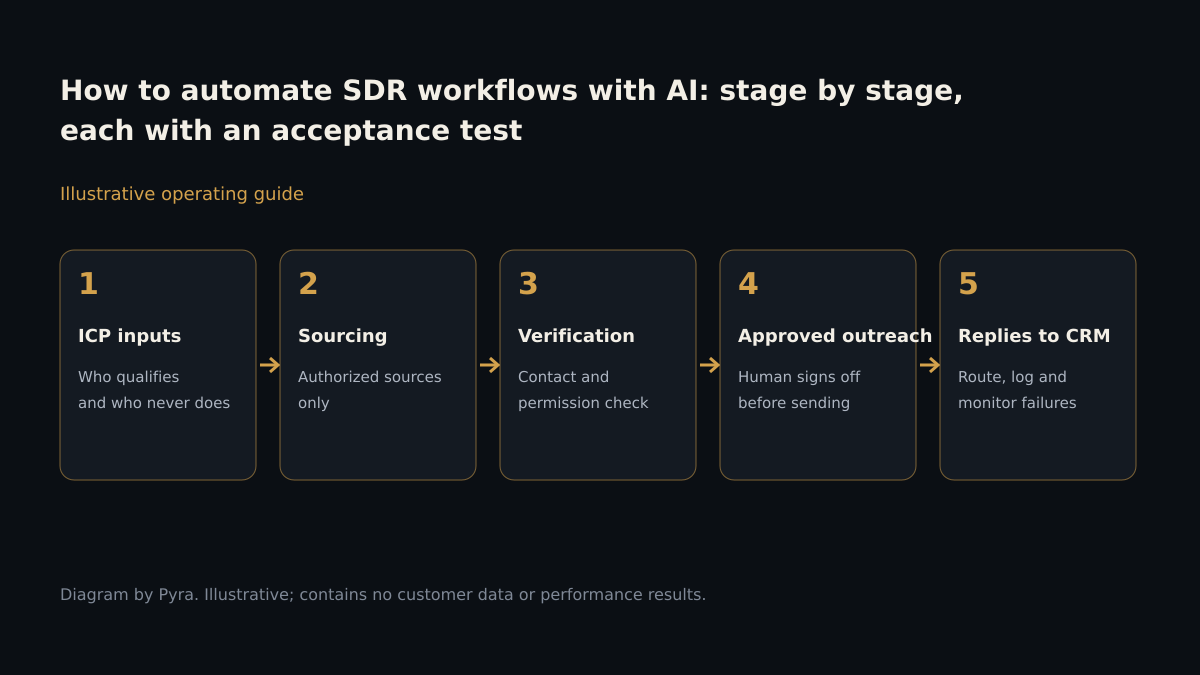
A sales development rep's work is a chain of small tasks, and automating the whole chain at once hides where errors begin. That is why how to automate SDR workflows with AI is a sequencing question. Staging it lets you find the weak link, keep a person at the decision points, and stop cleanly if something fails.
Eight stages with acceptance tests
How to automate SDR workflows with AI, stage by stage: what AI does, what a person owns, and the acceptance test
| Stage | AI may | Person owns | Acceptance test |
|---|---|---|---|
| 1. Qualification rules | Suggest criteria from past wins and losses | The written ideal customer profile and exclusions | Rules reproduce your own judgment on 20 known accounts |
| 2. Sourcing | Find accounts and people from authorized sources | Which sources are allowed | Every record names its source and date |
| 3. Verification and permission | Check contact validity; flag opt-outs and suppression matches | The suppression list and legal basis | Zero sample contacts from the suppression list reach the next stage |
| 4. Drafting | Draft messages from approved templates and cited facts | Template and claims policy | Every factual claim in a sample of 20 drafts is supported by the cited source |
| 5. Approval | Queue drafts with evidence | Approving, editing or rejecting | No message leaves without a recorded approval |
| 6. Sending | Schedule within limits you set | Volume, domains, send windows | Sent counts never exceed limits; opt-out link works |
| 7. Reply routing | Classify replies; update the CRM | Owner for each reply type | Sample replies reach the right owner within your time rule |
| 8. Monitoring | Alert on bounces, complaints and failures | Pause authority and review cadence | A test failure pauses sending and alerts a named person |
How to automate SDR workflows with AI in the right order
Earlier stages protect later ones. If qualification rules are vague, sourcing returns the wrong accounts and every later step is wasted. If verification and permission checks come after drafting, you will write messages for people you cannot contact. Stages 3 and 5 are the control points: nothing is sent to someone who failed a permission check, and nothing is sent without a person's approval.
How to automate SDR workflows with AI without changing your email duties
The FTC's CAN-SPAM guidance states that the law applies to business-to-business email and that every commercial message needs accurate header and subject information, identification as an ad, a postal address and a working opt-out honored within 10 business days. The FTC also states that you remain responsible when another company handles email for you. Automating the sending stage does not move that responsibility. This is general information, not legal advice.
How to automate SDR workflows with AI: a rollout plan
- Run stages 1 to 3 on one segment for two weeks, with no sending.
- Add drafting and approval, still with a person sending.
- Turn on scheduled sending at low volume and watch stage 8 closely.
- Review a sample of sent messages weekly and tighten the rules where errors appear.
- Increase volume only after a clean review period you defined in advance.
Pyra's Lead Seeker covers the sourcing and dossier stages with HubSpot and Salesforce connections as described on its page, and the AI sales agents page describes approval gates and audit trails for execution. Estimate the labor side with the ROI calculator before committing.
Questions readers ask
How to automate SDR workflows with AI without losing control?
Automate one stage at a time from qualification through monitoring, with a written acceptance test and a named human owner at each stage, and keep approval before any message is sent.
Which SDR task should I automate first?
Start with qualification rules and sourcing, which carry no outbound risk, then verification and drafting. Add sending last.
Can AI send outreach without approval?
It can be configured to, but this guide recommends a recorded human approval first, at least until a review period shows the drafts are accurate.
Does it change my email duties when I automate SDR workflows with AI?
No. The FTC states CAN-SPAM covers B2B email and that you remain responsible even when another company sends for you.
Sources
- FTC CAN-SPAM Act compliance guide for business applies to B2B email; opt-out timing; responsibility when others send. Read Nov 23, 2026.
- Pyra Lead Seeker live-search leads with dossiers and CRM connections as described by Pyra. Read Nov 23, 2026.
About the author
Bob Generale is COO and co-founder of Pyra, with 20+ years of Fortune 500 operations experience. This guide explains a recommended staged structure for automating SDR work, with an owner and acceptance test for each stage. It is not a benchmarked method, and Pyra sells Lead Seeker and sales agents.
Start with stages one to three
Write your qualification rules and suppression list, then test sourcing on one segment without sending.
See Lead Seeker