Best Pinterest Marketing Tools for Bloggers 2026: 7 Compared
The best Pinterest marketing tools for bloggers in 2026: Pinterest's own tools, Tailwind, Canva, Buffer, Later, Planoly and Viraly compared on nine criteria. Reviewed Nov 8, 2026.
Short answer: the best Pinterest marketing tools for bloggers depend on your bottleneck. Pinterest's own tools cover scheduling, RSS auto-publishing and trend research with no fee listed; Tailwind adds Pinterest keyword research and Pin creation; Canva handles design; Buffer, Later, Planoly and Viraly suit bloggers who schedule across channels. Of seven options reviewed on November 8, 2026, only Tailwind sells Pinterest keyword research as its own product.
This guide is for bloggers choosing tools to turn posts into Pins and measure what works. Prices and plan limits here come from vendor pages reviewed on November 8, 2026. Most top results for it are written by tool vendors, so each claim below is tied to the page it came from. Pyra makes Prime and Lead Seeker, covered later; neither is a Pinterest tool. Bob Generale, who wrote this guide, is also President of Percepture. "Not described" means the pages reviewed did not say, not that the feature is absent.
How we compared the best Pinterest marketing tools for bloggers
The same nine criteria were applied to every option, using only its public product, pricing and help pages. No hands-on test was run, and nothing here measures Pin performance or traffic. The order of the profiles is editorial judgement of fit for a blogger who starts with the free native tools and adds paid ones, not a score. The set is not exhaustive: it covers Pinterest's own tools plus tools that recur in current lists for this query. Prices are the figures displayed on the review date and differ by billing term.
| Criterion | The question it answers |
|---|---|
| Use-case fit | Is it built for Pinterest, or is Pinterest one channel among many? |
| Workflow depth | Can a blogger turn posts into Pins, schedule them and reuse them? |
| Collaboration | Does it describe seats, roles or approvals? |
| Analytics and measurement | Does it report on Pins, keywords or traffic? |
| AI assistance | What does the AI write, design or suggest? |
| Integrations | Does it name the systems it connects to? |
| Brand governance | Are brand kits, approvals or access controls described? |
| Pricing | Is a price published, and for which billing term? |
| Time to value | Is there a free plan, trial or fast setup path? |
Best Pinterest marketing tools for bloggers compared
Two tables, the same seven tools in profile order. The first covers fit, workflow, collaboration, analytics and AI; the second covers integrations, governance, price and time to value. Scroll sideways on small screens.
| Tool | Kind | Use-case fit | Workflow depth | Collaboration | Analytics | AI assistance |
|---|---|---|---|---|---|---|
| Pinterest's own business tools | Native scheduler, RSS publishing, Analytics and Trends | Publishing and measuring Pins on the platform itself, plus trend research | Schedule standard Pins up to 30 days ahead, one at a time, with up to 10 scheduled at once; bulk upload; RSS auto-publish that turns each feed image into a Pin | Not described on the pages reviewed | Pinterest Analytics shows performance of paid and organic content, with top Pins and boards over the last 30 days; Pinterest Trends shows up to two years of search, save and shopping trends by region | Trend predictions appear where a crystal-ball icon is shown in Trends; AI writing or design help is not described |
| Tailwind | Pinterest-specific scheduling, keyword research and Turbo boosting | Pinterest only; sold as three products: Pin Scheduling & Creation, Pinterest SEO and Pinterest Engagement | Weekly Pin creation, smart scheduling with Pin spacing, SEO-optimized Pin filenames, and a website sync | Not described on the pricing page | Keyword tracking for the terms you want to win and a view of which keywords Pinterest matched to your Pins; Pin performance reporting is not described | Creates and writes Pins; 300 credits a month with scheduling and 50 with each of the other two products |
| Canva | Design editor with templates and AI tools | Making the Pin image; scheduling is listed as a general social content feature on Pro | Drag-and-drop editor, 1.6M+ templates on Free and 3.6M+ on paid plans, AI resize, translate and background removal on Pro | Collaboration and team admin tools on Business | Ad insights are listed; Pin performance analytics are not described | AI tools on Pro, 10x the AI usage of Free, and 20x on Business; the AI Pass add-on costs extra |
| Buffer | Multi-channel scheduler priced per channel | Scheduling photo and video Pins alongside other channels, with crossposting to Instagram, Facebook, TikTok and Threads | You choose the board, title, description and link for each Pin; an ideas space with boards and color-coded tags; crossposting | 1 user on Free and Essentials; unlimited team members, access levels and content approval workflows on Team | Insights on Free, advanced analytics on Essentials and Team; the Pinterest page mentions metrics at a glance | An AI Assistant on every plan, and AI help generating Pin ideas per the Pinterest page |
| Later | Social scheduler with approvals and analytics | Scheduling Pins among 8 supported platforms | Smart Scheduling with future trends and multi-profile Best Times to Post on Growth; posts per profile capped at 30 on Starter, 180 on Growth, unlimited on Scale | 1 user on Starter, 2 on Growth with internal and external collaboration, approvals and custom roles, 4 on Scale | Platform analytics for up to 3 months on Starter, 1 year on Growth and 2 years on Scale; competitive benchmarking and brand mentions on Scale | AI credits for Ideas and Caption Writer: 5 a month on Starter, 50 on Growth, 100 on Scale |
| Planoly | Visual social planner with link in bio | A single calendar across Instagram, TikTok, LinkedIn, Facebook, YouTube, Threads and Pinterest | Auto-post where the platform allows it and reminders where it does not, a media library, an AI idea generator and a calendar of holidays and trends | 1 user on Starter, 2 on Growth, 6 on Pro; extra users $5 a month on Growth and $3 on Pro | Not described on the pricing page | Post ideas, keyword recommendations and caption suggestions |
| Viraly | Multi-platform scheduler with analytics and AI | Scheduling to 11 platforms; Pinterest Analytics is listed among its analytics features | Scheduling, content recycling, content queues, a media library, hashtag lists and link in bio | Free to Influencer plans are solo; Business allows 3 team members, real-time collaboration and role assignments; Agency and Enterprise have unlimited team members | 2 weeks of analytics on Free, 6 months on Influencer, 12 months on Business, 2 years on Agency; competitor profiles from Business | An AI assistant, caption generator and AI image generation (20 images a month on Influencer, 100 on Business, 500 on Agency) |
| Tool | Integrations | Brand governance | Pricing | Time to value |
|---|---|---|---|---|
| Pinterest's own business tools | RSS 2.x and 1.x feeds from a claimed website; Atom is not supported | Not described | No fee is listed on the help pages reviewed; a business account is required | Available once a business account exists and the website is claimed for RSS |
| Tailwind | Website sync; other integrations are not described on the pricing page | Not described | Per Pinterest account on annual billing: scheduling $17.99, SEO $11.99, Engagement $11.99 a month; monthly prices $29.99, $14.99, $14.99; bundle $29.98 a month annual or $41.97 monthly; 100 extra credits cost $10 (tailwindapp.com/pricing, Nov 8, 2026) | Start free with no credit card |
| Canva | Not described on the pricing page; whether the scheduler publishes to Pinterest is not stated there | 1 Brand Kit on Free (3 colors), 5 on Pro, 100 with approvals on Business | Free; Pro US$144 a year for one person; Business US$250 a year per person, as displayed for yearly billing (canva.com/pricing, Nov 8, 2026) | A free plan with templates |
| Buffer | API access (1 key on Free, 3 on Essentials, 5 on Team), a community inbox and a hashtag manager | Access levels and approval workflows on Team | Free for up to 3 channels; Essentials $5 and Team $10 a month per channel, or $60 and $120 a year (buffer.com/pricing, Nov 8, 2026) | A free plan; paid plans have a 14-day trial |
| Later | Eight social platforms, including Pinterest; other integrations are not described on the pricing page | Custom roles and permissions on Growth and above | Starter $18.75, Growth $37.50, Scale $82.50 a month billed yearly (3 months free, 25% off); extra social sets $11.25 and users $3.75 a month (later.com/pricing, Nov 8, 2026) | A 14-day free trial |
| Planoly | Link in bio, digital product sales and Instagram DM automation; other integrations are not described | Not described | Plans start at $14 a month; Growth and Pro prices are not shown in the page text reviewed; extra social sets $10 (Growth) and $8 (Pro) a month (planoly.com/pricing, Nov 8, 2026) | A 14-day free trial on paid plans, and a free mobile plan with 10 uploads a month |
| Viraly | Slack, Microsoft Teams, Discord and n8n on Business; a public REST API and webhooks on Agency; an MCP server for Claude, ChatGPT and Cursor | Role assignments on Business; white-label branding and a read-only client role on Enterprise | Free; Influencer $19, Business $49, Agency $99, Enterprise $249 a month as displayed; yearly billing saves 17% (viraly.io/pricing, Nov 8, 2026) | A free plan with 3 social profiles, no card required |
Profiles
1. Native scheduler, RSS publishing, Analytics and Trends
Pinterest's own business tools
Best fit: Bloggers with a business account who want to start with no added subscription.
Use-case fit: Publishing and measuring Pins on the platform itself, plus trend research. Workflow: Schedule standard Pins up to 30 days ahead, one at a time, with up to 10 scheduled at once; bulk upload; RSS auto-publish that turns each feed image into a Pin.
Collaboration: Not described on the pages reviewed. Analytics: Pinterest Analytics shows performance of paid and organic content, with top Pins and boards over the last 30 days; Pinterest Trends shows up to two years of search, save and shopping trends by region.
AI: Trend predictions appear where a crystal-ball icon is shown in Trends; AI writing or design help is not described. Integrations: RSS 2.x and 1.x feeds from a claimed website; Atom is not supported. Governance: Not described.
Pricing: No fee is listed on the help pages reviewed; a business account is required. Time to value: Available once a business account exists and the website is claimed for RSS.
Strength: RSS auto-publish creates Pins from new posts, up to 200 Pins a day, within 24 hours of a feed update.
Limitation: Scheduled Pins cannot have their image or video edited, only one Pin is scheduled at a time, and some Trends features are in testing in certain regions only.
What to verify: Whether your blog's feed images are good enough to publish as Pins unedited, since RSS takes the image from the feed.
Source: Pinterest Help: Schedule Pins, RSS auto-publish, Analytics and Trends (reviewed November 8, 2026).
2. Pinterest-specific scheduling, keyword research and Turbo boosting
Tailwind
Best fit: Bloggers who want Pinterest keyword research and Pin creation from their own site in one Pinterest-only tool.
Use-case fit: Pinterest only; sold as three products: Pin Scheduling & Creation, Pinterest SEO and Pinterest Engagement. Workflow: Weekly Pin creation, smart scheduling with Pin spacing, SEO-optimized Pin filenames, and a website sync.
Collaboration: Not described on the pricing page. Analytics: Keyword tracking for the terms you want to win and a view of which keywords Pinterest matched to your Pins; Pin performance reporting is not described.
AI: Creates and writes Pins; 300 credits a month with scheduling and 50 with each of the other two products. Integrations: Website sync; other integrations are not described on the pricing page. Governance: Not described.
Pricing: Per Pinterest account on annual billing: scheduling $17.99, SEO $11.99, Engagement $11.99 a month; monthly prices $29.99, $14.99, $14.99; bundle $29.98 a month annual or $41.97 monthly; 100 extra credits cost $10 (tailwindapp.com/pricing, Nov 8, 2026). Time to value: Start free with no credit card.
Strength: It is the only option here that sells Pinterest keyword research as its own product.
Limitation: Each scheduled Pin uses 1 credit, so the monthly allowance caps volume, and it covers Pinterest only.
What to verify: How many Pins a month you will schedule against the credit allowance, and which of the three products you need.
Source: tailwindapp.com pricing page (reviewed November 8, 2026).
3. Design editor with templates and AI tools
Canva
Best fit: Bloggers who design their own Pin graphics and want brand kits and templates.
Use-case fit: Making the Pin image; scheduling is listed as a general social content feature on Pro. Workflow: Drag-and-drop editor, 1.6M+ templates on Free and 3.6M+ on paid plans, AI resize, translate and background removal on Pro.
Collaboration: Collaboration and team admin tools on Business. Analytics: Ad insights are listed; Pin performance analytics are not described.
AI: AI tools on Pro, 10x the AI usage of Free, and 20x on Business; the AI Pass add-on costs extra. Integrations: Not described on the pricing page; whether the scheduler publishes to Pinterest is not stated there. Governance: 1 Brand Kit on Free (3 colors), 5 on Pro, 100 with approvals on Business.
Pricing: Free; Pro US$144 a year for one person; Business US$250 a year per person, as displayed for yearly billing (canva.com/pricing, Nov 8, 2026). Time to value: A free plan with templates.
Strength: Brand Kits let a blogger keep fonts, colors and logos consistent across Pin designs.
Limitation: The pricing page describes design and general scheduling, not Pinterest keywords or Pin analytics.
What to verify: Which networks Canva's scheduler publishes to on your plan, and whether Pinterest is one of them.
Source: canva.com pricing page (reviewed November 8, 2026).
4. Multi-channel scheduler priced per channel
Buffer
Best fit: Bloggers who want a low per-channel price and to repost Pins to other networks.
Use-case fit: Scheduling photo and video Pins alongside other channels, with crossposting to Instagram, Facebook, TikTok and Threads. Workflow: You choose the board, title, description and link for each Pin; an ideas space with boards and color-coded tags; crossposting.
Collaboration: 1 user on Free and Essentials; unlimited team members, access levels and content approval workflows on Team. Analytics: Insights on Free, advanced analytics on Essentials and Team; the Pinterest page mentions metrics at a glance.
AI: An AI Assistant on every plan, and AI help generating Pin ideas per the Pinterest page. Integrations: API access (1 key on Free, 3 on Essentials, 5 on Team), a community inbox and a hashtag manager. Governance: Access levels and approval workflows on Team.
Pricing: Free for up to 3 channels; Essentials $5 and Team $10 a month per channel, or $60 and $120 a year (buffer.com/pricing, Nov 8, 2026). Time to value: A free plan; paid plans have a 14-day trial.
Strength: Per-channel pricing means a solo blogger can run a single Pinterest channel at a published monthly price.
Limitation: The Free plan holds 10 scheduled posts per channel, and Pinterest keyword research is not described.
What to verify: Cost across all the channels you connect, since each channel is priced separately.
Source: buffer.com pricing and Pinterest pages (reviewed November 8, 2026).
5. Social scheduler with approvals and analytics
Later
Best fit: Bloggers or small teams who also publish video and want analytics history and approvals.
Use-case fit: Scheduling Pins among 8 supported platforms. Workflow: Smart Scheduling with future trends and multi-profile Best Times to Post on Growth; posts per profile capped at 30 on Starter, 180 on Growth, unlimited on Scale.
Collaboration: 1 user on Starter, 2 on Growth with internal and external collaboration, approvals and custom roles, 4 on Scale. Analytics: Platform analytics for up to 3 months on Starter, 1 year on Growth and 2 years on Scale; competitive benchmarking and brand mentions on Scale.
AI: AI credits for Ideas and Caption Writer: 5 a month on Starter, 50 on Growth, 100 on Scale. Integrations: Eight social platforms, including Pinterest; other integrations are not described on the pricing page. Governance: Custom roles and permissions on Growth and above.
Pricing: Starter $18.75, Growth $37.50, Scale $82.50 a month billed yearly (3 months free, 25% off); extra social sets $11.25 and users $3.75 a month (later.com/pricing, Nov 8, 2026). Time to value: A 14-day free trial.
Strength: Analytics history is published by tier, up to two years on Scale.
Limitation: Starter caps scheduling at 30 posts per profile a month, and the tool does not describe Pinterest keyword research.
What to verify: Whether the monthly post cap per profile fits a Pinterest cadence that includes fresh Pins every day.
Source: later.com pricing page (reviewed November 8, 2026).
6. Visual social planner with link in bio
Planoly
Best fit: Bloggers who plan Instagram and Pinterest together and want a link-in-bio page.
Use-case fit: A single calendar across Instagram, TikTok, LinkedIn, Facebook, YouTube, Threads and Pinterest. Workflow: Auto-post where the platform allows it and reminders where it does not, a media library, an AI idea generator and a calendar of holidays and trends.
Collaboration: 1 user on Starter, 2 on Growth, 6 on Pro; extra users $5 a month on Growth and $3 on Pro. Analytics: Not described on the pricing page.
AI: Post ideas, keyword recommendations and caption suggestions. Integrations: Link in bio, digital product sales and Instagram DM automation; other integrations are not described. Governance: Not described.
Pricing: Plans start at $14 a month; Growth and Pro prices are not shown in the page text reviewed; extra social sets $10 (Growth) and $8 (Pro) a month (planoly.com/pricing, Nov 8, 2026). Time to value: A 14-day free trial on paid plans, and a free mobile plan with 10 uploads a month.
Strength: A free link-in-bio page and a media library sit in the same plan as the planner.
Limitation: Whether Pinterest is auto-posted or only reminded is not stated on the page, and analytics are not described.
What to verify: Whether Pinterest publishes automatically on your plan, and how many social sets you need.
Source: planoly.com pricing page (reviewed November 8, 2026).
7. Multi-platform scheduler with analytics and AI
Viraly
Best fit: Bloggers who want Pinterest analytics, competitor profiles and an API at a published price.
Use-case fit: Scheduling to 11 platforms; Pinterest Analytics is listed among its analytics features. Workflow: Scheduling, content recycling, content queues, a media library, hashtag lists and link in bio.
Collaboration: Free to Influencer plans are solo; Business allows 3 team members, real-time collaboration and role assignments; Agency and Enterprise have unlimited team members. Analytics: 2 weeks of analytics on Free, 6 months on Influencer, 12 months on Business, 2 years on Agency; competitor profiles from Business.
AI: An AI assistant, caption generator and AI image generation (20 images a month on Influencer, 100 on Business, 500 on Agency). Integrations: Slack, Microsoft Teams, Discord and n8n on Business; a public REST API and webhooks on Agency; an MCP server for Claude, ChatGPT and Cursor. Governance: Role assignments on Business; white-label branding and a read-only client role on Enterprise.
Pricing: Free; Influencer $19, Business $49, Agency $99, Enterprise $249 a month as displayed; yearly billing saves 17% (viraly.io/pricing, Nov 8, 2026). Time to value: A free plan with 3 social profiles, no card required.
Strength: Plan limits for profiles, posts, analytics history and team seats are all published.
Limitation: Which plans include Pinterest Analytics is not clear from the page text, and Pinterest keyword research is not described.
What to verify: Which plan shows Pinterest Analytics for your account before paying, and the real post and profile limits you need.
Source: viraly.io pricing page (reviewed November 8, 2026).
What happens after the Pin
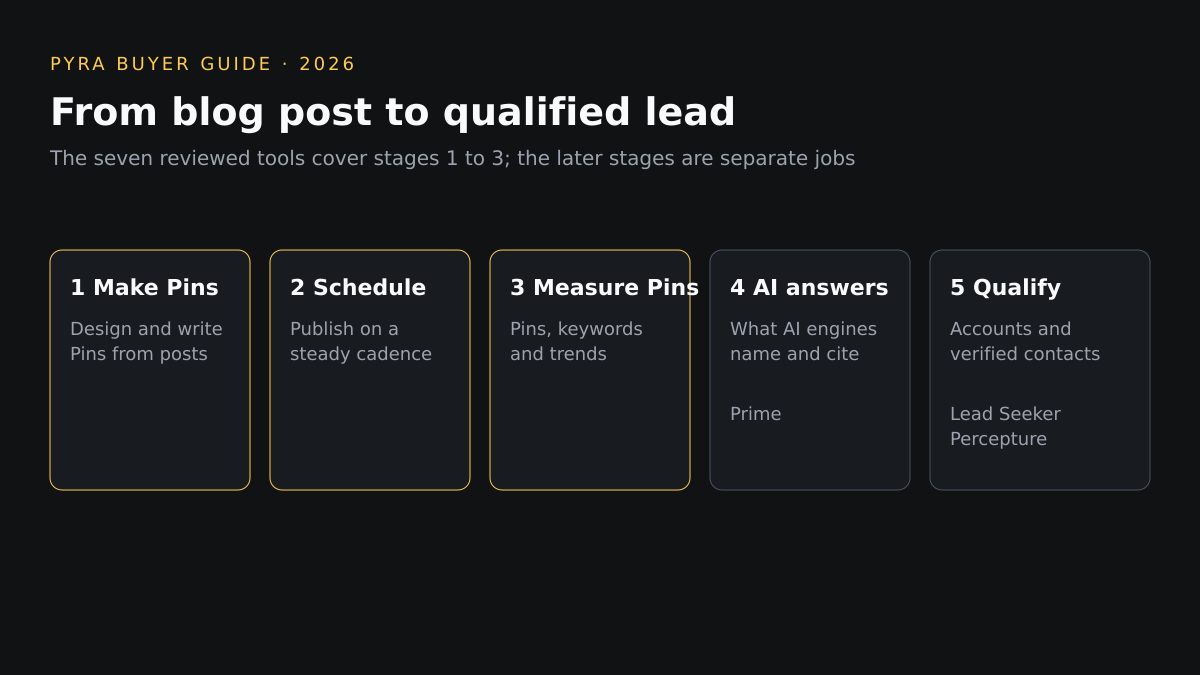
A Pinterest impression isn't a qualified lead. Pins and distribution influence discovery, and the tools above stop at the Pin: none of the pages reviewed describes measuring what AI answer engines say about your brand or which accounts are researching you. If your blog sells to businesses, buyers also ask ChatGPT, Perplexity, Gemini and Google's AI answers who to consider. Prime AI Visibility, a Pyra product, shows what those engines name and cite for your buyers' questions; it does not monitor Google organic rankings. Its guide to choosing an AI visibility tool covers engine coverage, refresh cadence, prompt ownership, metric definitions, raw-data export and pricing, and suggests trialing a tool with about ten real buyer questions.
Next comes deciding which accounts deserve follow-up. Lead Seeker handles B2B prospecting, verified contacts and buyer dossiers; it does not track AI answers. When those intent signals need to become qualified account selection, campaign execution or sales activation, Percepture's B2B intent data services connect them. These are separate tools and services, not one product, and none of them schedules or designs a Pin.
For AI agents that can run parts of a marketing workflow with human approval, see our guide to AI agents for marketing teams. For platforms that send one message across channels, see the omnichannel marketing tools comparison.
Best Pinterest marketing tools for bloggers: questions buyers ask
Do bloggers need a paid Pinterest scheduler?
Not always. Pinterest's own scheduler lets a business account schedule standard Pins up to 30 days ahead, one at a time, with up to 10 scheduled at once, and its RSS auto-publish can create Pins from a blog feed. A paid tool earns its cost when you need volume beyond that, keyword research or multi-channel scheduling.
What does RSS auto-publish do for a blog?
It connects your blog's RSS feed to a business account that has claimed the website, and Pinterest creates a Pin for each image in the feed. New content is added to a board within 24 hours, at up to 200 Pins a day. It supports RSS 2.x and 1.x, not Atom, and the Pin takes its image from the feed.
Is Pinterest keyword research included in the schedulers?
In the pages reviewed on November 8, 2026, only Tailwind describes Pinterest keyword research, and it sells it as a separate $11.99 a month product on annual billing. Pinterest Trends, which is Pinterest's own tool, shows up to two years of search and save trends by region. The other tools' pricing pages do not describe keyword research.
Does a Pinterest tool show whether visitors become leads?
No. These tools schedule, design or measure Pins, and none of the pages reviewed describes qualifying visitors as leads or measuring what AI answer engines say about your brand. The section on what happens after the Pin covers those separate jobs for blogs that sell to businesses.
Sources
Vendor pages are linked from each profile and were reviewed November 8, 2026. Pinterest Help: auto-publish Pins from your RSS feed, Pinterest Analytics and Pinterest Trends. Written by Bob Generale, COO and co-founder of Pyra and President of Percepture; reviewed by Alex Mannine.
Plan what comes after the Pin
Talk with Pyra about visibility in AI answers, buyer-fit accounts and the signals that should turn blog traffic into pipeline.