What Is the Best Chat Tool for Content Discovery? 5 AI Chat Tools Compared (2026)
What is the best chat tool for content discovery? Perplexity, ChatGPT, Claude, Gemini and Microsoft 365 Copilot compared on nine criteria, with pricing. Reviewed Nov 5, 2026.
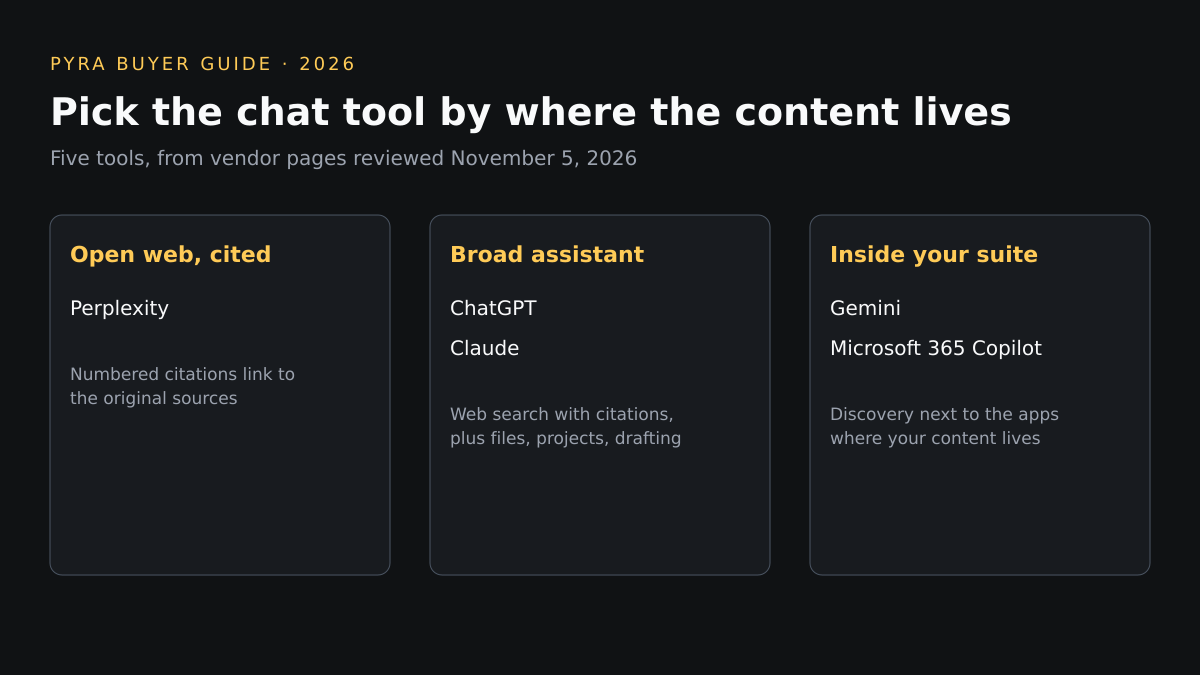
Short answer: what is the best chat tool for content discovery depends on where the content lives. Perplexity is built around cited web answers, ChatGPT covers the widest range of work, Claude suits long documents you need to read closely, Gemini fits Google Workspace, and Microsoft 365 Copilot searches your own Microsoft data. None of them measures how your own content performs.
This guide is for marketers, editors and researchers who use an AI chat tool to find articles, sources, topics and gaps. Pyra makes Prime AI Visibility and Lead Seeker, which appear only in the section after the comparison; Bob Generale, who wrote this guide, is also President of Percepture. All five tools are held to the same nine criteria from each vendor's public pages on November 5, 2026. "Not itemized" means those pages did not list it, and no hands-on scores were produced.
How we compared AI chat tools for content discovery
Content discovery here means finding articles, sources and topics, not tracking where your own pages appear. The same nine criteria were applied to every option using only its public pricing and help pages. The order is editorial: open-web research first, then broad assistants, then tools tied to a work suite. Search results from any chat tool can be wrong, so every profile ends with what to verify.
| Criterion | The question it answers |
|---|---|
| Use-case fit | Is it built for finding content on the open web, in your own files, or both? |
| Workflow depth | Can discovery continue into deeper research, files or projects? |
| Collaboration | Can a team share what it found? |
| Analytics and measurement | Does it show how your own content is discovered or performs? |
| AI assistance | How does it surface and attribute sources? |
| Integrations | Does it connect to the apps where content lives? |
| Brand governance | Can an admin control search, data use and access? |
| Pricing | What does each plan cost on the public page? |
| Time to value | How quickly can a team run a first useful search? |
Best AI chat tools for content discovery compared
Two tables, the same five options. The first covers fit, workflow, collaboration, analytics and AI assistance; the second covers integrations, governance, pricing, time to value and limitations. Scroll sideways on small screens.
| Tool | Use-case fit | Workflow depth | Collaboration | Analytics | AI assistance |
|---|---|---|---|---|---|
| Perplexity | Source-first web research | Pro Search for deeper questions; Pro allows up to 50 file uploads per project; Max adds Research queries | Enterprise Pro lists shared Projects and internal knowledge search; individual plans do not itemize sharing | None described for content performance | Help center says each answer includes numbered citations linking to the original sources; Pro adds access to advanced AI models |
| ChatGPT | Broad discovery plus drafting and file work in one chat | Searches the web automatically or from the Search tool; Plus lists expanded deep research, Projects, scheduled tasks and custom GPTs | Business, Enterprise and Edu plans exist; shared-workspace features are not itemized on the pages reviewed | None described for content performance | Web search with citations on Free, Go, Plus, Pro, Business, Enterprise and Edu; people who are not signed in can also search |
| Claude | Close reading and synthesis of found sources | Web search and web fetch of links you give it; Projects (up to 5 on Free, available on paid plans) and Research from Pro upward | The individual-plan table shows no project sharing; Team and Enterprise plans are listed separately | None described for content performance | Support page says every web-search response includes citations; Research is listed from Pro upward |
| Gemini | Discovery inside the Google ecosystem | Deep Research, Canvas and Gems on the Free plan; a research and writing assistant called Gemini Notebook; documents of up to 1,500 pages can be uploaded for analysis | Gemini Enterprise Business edition is aimed at small businesses and teams, with no IT setup needed | None described for content performance | Deep Research is listed on Free; Google AI Pro lists access to its Pro model |
| Microsoft 365 Copilot | Discovery across your own Microsoft 365 content | AI chat grounded in your work data, with pre-built agents for research and data analysis, available in Word, Excel, PowerPoint, Outlook and Teams | Microsoft's pricing page says Copilot Notebooks is rolling out to more of a team for Copilot Chat users | None described for content performance | Large language model choice listed in the plan highlights |
| Tool | Integrations | Governance | Pricing shown | Time to value | Limitations |
|---|---|---|---|---|---|
| Perplexity | Enterprise Pro lists centrally governed file connectors; its help center has a connectors and integrations section | Enterprise Pro lists Trust Center access, data never used for training and advanced seat management | Free (Standard), Pro and Max for individuals; Education Pro $10 a month with verification; Enterprise Pro starts at $40 a month or $400 a year per seat | Free plan covers practically unlimited basic searches, with very limited Pro Searches | The Free plan limits Pro Search, and the pages reviewed do not describe content analytics or individual-plan collaboration. |
| ChatGPT | Not itemized on the pages reviewed | Business and Enterprise plans exist; admin controls are not itemized on the pages reviewed | Free, Go, Plus and Pro for individuals, plus separately sold Business and Enterprise plans; current rates are on its pricing page | Web search is available without an account, subject to plan usage limits | OpenAI's own help page says search results and citations can be incomplete, outdated or incorrect, and that you should open the source to check it. |
| Claude | Connectors on all four individual plans; Claude in Chrome and Microsoft 365 listed on Pro | On Team and Enterprise, an Owner must enable web search for the whole workspace in organization settings | Free $0; Pro $17 a month billed annually ($200 up front) or $20 monthly; Max $100 a month; Ultra $200 a month | Free plan includes web search, with usage limits that reset every five hours | On Free, web search and page fetching both count toward the usage limit, and Research is not included. |
| Gemini | Gemini in Gmail and Docs on paid Google AI plans; Gemini Enterprise lists connectors for Microsoft 365, Google Workspace, HubSpot, Jira and more | Business edition is described as securely connecting to productivity tools; admin policy details are not itemized on the page reviewed | Free $0; Google AI Plus $4.99 a month; Google AI Pro $19.99 a month; Google AI Ultra from $99.99 a month; Gemini Enterprise Business from $21 per seat a month (US page) | Free with a Google Account; Business edition has a trial | Prices and limits shown are for the United States, and plan names and usage tiers change often. |
| Microsoft 365 Copilot | Word, Excel, PowerPoint, Outlook and Teams | Business plans list policy-based identity and access management for up to 300 users; a qualifying plan is required | Copilot Business add-on from $18 per user a month paid yearly (shown as reduced from $21); Microsoft 365 Business Standard with Copilot $23.50 and Business Premium with Copilot $32 per user a month paid yearly | Requires a qualifying Microsoft plan; may not be available in all markets and languages; trial offered | The pricing page does not describe open-web source discovery, so it is the narrowest option here for finding outside content. |
Profiles
Answer engine
Perplexity
Best fit: Finding and checking sources on the open web, one cited answer at a time.
Evidence: Pro Search for deeper questions; Pro allows up to 50 file uploads per project; Max adds Research queries. Sources: Help center says each answer includes numbered citations linking to the original sources; Pro adds access to advanced AI models.
Pricing: Free (Standard), Pro and Max for individuals; Education Pro $10 a month with verification; Enterprise Pro starts at $40 a month or $400 a year per seat.
Strength: The answer format puts the sources next to the claim, which suits a discovery task where you will open and judge the links.
Limitation: The Free plan limits Pro Search, and the pages reviewed do not describe content analytics or individual-plan collaboration.
What to verify: Which plan includes the research depth you need, and whether the cited pages actually support each statement before you reuse it.
Source: How Perplexity works, Perplexity plan guide (reviewed November 5, 2026).
General assistant with web search
ChatGPT
Best fit: Teams that want one assistant for discovery, drafting and file work, with sources to open.
Evidence: Searches the web automatically or from the Search tool; Plus lists expanded deep research, Projects, scheduled tasks and custom GPTs. Sources: Web search with citations on Free, Go, Plus, Pro, Business, Enterprise and Edu; people who are not signed in can also search.
Pricing: Free, Go, Plus and Pro for individuals, plus separately sold Business and Enterprise plans; current rates are on its pricing page.
Strength: The widest set of tools in one place, so a found source can become a brief, a table or a draft without leaving the chat.
Limitation: OpenAI's own help page says search results and citations can be incomplete, outdated or incorrect, and that you should open the source to check it.
What to verify: Deep research limits on your plan, whether Business or Enterprise terms cover team use, and the publication date of each source it cites.
Source: Searching the web with ChatGPT, ChatGPT pricing (reviewed November 5, 2026).
General assistant with web search and Research
Claude
Best fit: Reading long articles and documents closely after you have found them.
Evidence: Web search and web fetch of links you give it; Projects (up to 5 on Free, available on paid plans) and Research from Pro upward. Sources: Support page says every web-search response includes citations; Research is listed from Pro upward.
Pricing: Free $0; Pro $17 a month billed annually ($200 up front) or $20 monthly; Max $100 a month; Ultra $200 a month.
Strength: Citations on every web answer and a stated ability to fetch and analyze the full text of a page you link.
Limitation: On Free, web search and page fetching both count toward the usage limit, and Research is not included.
What to verify: Whether Team or Enterprise sharing meets your review process, and which plan your Research volume needs.
Source: Enabling and using web search, Claude pricing (reviewed November 5, 2026).
Assistant tied to Google apps
Gemini
Best fit: Teams that already work in Google Workspace and want research next to Gmail and Docs.
Evidence: Deep Research, Canvas and Gems on the Free plan; a research and writing assistant called Gemini Notebook; documents of up to 1,500 pages can be uploaded for analysis. Sources: Deep Research is listed on Free; Google AI Pro lists access to its Pro model.
Pricing: Free $0; Google AI Plus $4.99 a month; Google AI Pro $19.99 a month; Google AI Ultra from $99.99 a month; Gemini Enterprise Business from $21 per seat a month (US page).
Strength: Deep Research is on the free tier and the assistant sits inside the Google apps many marketing teams already use.
Limitation: Prices and limits shown are for the United States, and plan names and usage tiers change often.
What to verify: Your region's pricing, which Workspace edition includes Gemini, and how citations appear in Deep Research output.
Source: Gemini plans and pricing (reviewed November 5, 2026).
Assistant grounded in work data
Microsoft 365 Copilot
Best fit: Teams that need to find content already inside their Microsoft 365 environment, not on the open web.
Evidence: AI chat grounded in your work data, with pre-built agents for research and data analysis, available in Word, Excel, PowerPoint, Outlook and Teams. Sources: Large language model choice listed in the plan highlights.
Pricing: Copilot Business add-on from $18 per user a month paid yearly (shown as reduced from $21); Microsoft 365 Business Standard with Copilot $23.50 and Business Premium with Copilot $32 per user a month paid yearly.
Strength: Answers are grounded in the documents, mail and chats a team already has, so internal discovery needs no export step.
Limitation: The pricing page does not describe open-web source discovery, so it is the narrowest option here for finding outside content.
What to verify: Whether your Microsoft plan qualifies, which data sources the chat can reach, and what an admin can restrict.
Source: Microsoft 365 Copilot plans and pricing (reviewed November 5, 2026).
From finding content to being found
Discovery is the beginning, not the conversion. The tools above help you find other people's content; buyers use the same kind of tools to find yours, and none of the five shows you what they say about your company. Prime AI Visibility re-runs your buyer questions across the AI engines it supports and records whether your brand is named and whether your own pages are cited, which Prime's strategy material treats as separate signals. It does not monitor Google organic rankings. Prime's guide to choosing an AI visibility tool scores six axes: engines covered, refresh cadence, prompt ownership, metric definitions, raw-data export and pricing. If Perplexity is the engine you care about, our Perplexity rank tracker comparison is the place to start.
Visibility is one step in a longer journey. Lead Seeker is a separate product for B2B prospecting: it finds buyer-fit contacts with verified emails and builds a dossier on each, and it does not track AI answers. Once a team has accounts worth pursuing, the same research habits feed our guide to AI agents for marketing teams.
Signals only matter when they reach the people who act on them. When intent signals must become qualified account selection, campaign execution or sales activation, Percepture's B2B intent data services design that workflow. These are three different offerings, not one tool; Pyra can help you decide which step to start with.
Best chat tool for content discovery: questions buyers ask
What is the best chat tool for content discovery?
It depends on where the content lives. On the pages reviewed on November 5, 2026, Perplexity is built around cited web answers, ChatGPT covers the widest range of work, Claude suits long documents you need to read closely, Gemini fits Google Workspace, and Microsoft 365 Copilot searches your own Microsoft data. Pick by source location, then test with five real questions.
Is Perplexity better than ChatGPT for finding sources?
Both show citations. Perplexity's help center says each answer includes numbered citations, and OpenAI's help page says responses that use web search may include citations you can open. OpenAI also warns that search results and citations can be incomplete, outdated or incorrect, so open the source before you rely on it, whichever tool you use.
Can a chat tool tell me how my own content performs?
None of the five vendors' pages reviewed describes content analytics. A chat tool helps you find and read content; measuring whether AI answers name or cite your own pages is a separate job for a tool that re-runs the same questions over time.
Do I need a paid plan for content discovery?
Not to start. On the pages reviewed, ChatGPT Free, Claude Free and Perplexity's Free plan include web search or basic searches, and Gemini's Free plan lists Deep Research. Each limits usage differently, and deeper research, sharing and admin controls sit on paid or business plans.
Sources
Vendor pages are linked from each profile. Plans, limits and prices are what each vendor displayed on November 5, 2026; several show United States pricing and change often. Written by Bob Generale; reviewed by Alex Mannine.
Find out what AI answers say about your company
Talk with Pyra about the buyer questions that matter, which engines to check and how to turn the answers into a plan.