Best YouTube SEO Tools 2026: 5 Compared on Research, Tracking and Price
The best YouTube SEO tools in 2026: YouTube Studio Analytics, vidIQ, TubeBuddy, 1of10 and Morningfame compared on nine criteria, from keyword research and rank tracking to team limits and price. Reviewed Nov 8, 2026.
Short answer: the best YouTube SEO tools in 2026 depend on whether you need research, tracking or your own data. YouTube Studio Analytics is the free first-party start. vidIQ and 1of10 lead on idea and outlier research, TubeBuddy lists the most search and tag tools, and Morningfame is invite-only. Of five options reviewed on November 8, 2026, only TubeBuddy lists rank tracking by name.
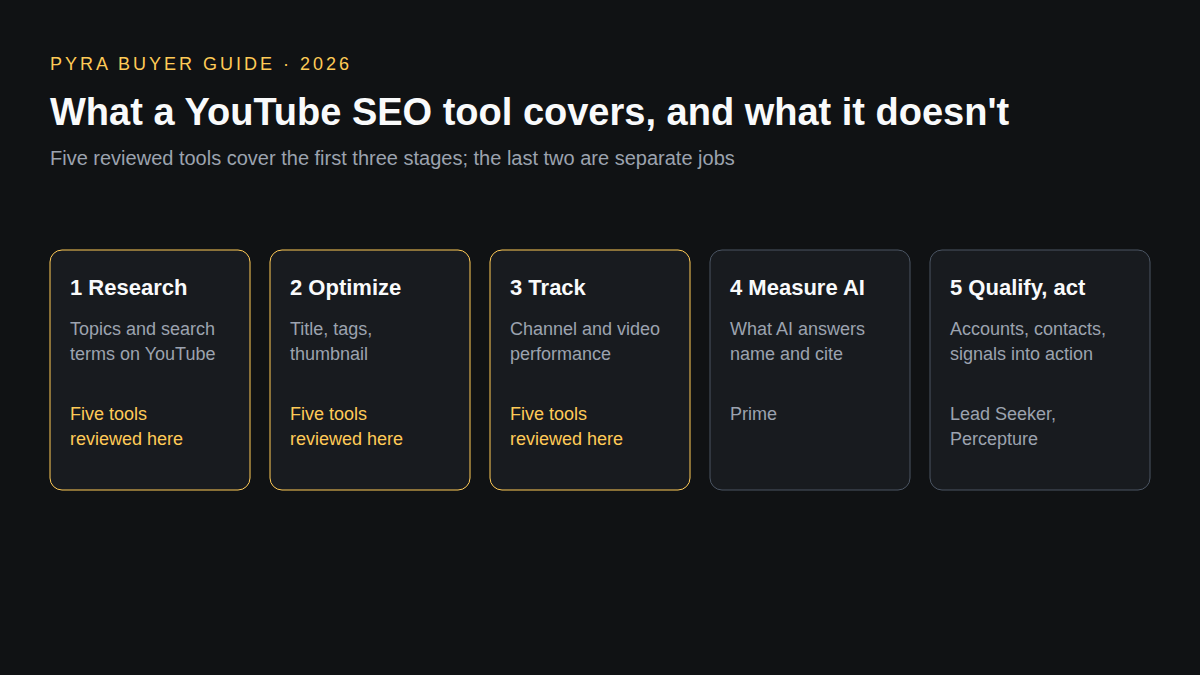
This guide is for creators, in-house video marketers and small agencies choosing a tool to help videos get found in YouTube search. The query "best youtube seo tools 2026" returns mostly lists published by the tools themselves: vidIQ's own list compares five tools and 1of10's lists ten, so every claim below is tied to the vendor or YouTube page it came from, reviewed on November 8, 2026. Pyra makes Prime and Lead Seeker, covered at the end; they are not YouTube SEO tools. Bob Generale, who wrote this guide, is also President of Percepture. "Not described" means the pages reviewed did not say, not that the feature is absent.
How the best YouTube SEO tools were compared
Nine criteria were applied to every option, using only its public pricing, product and help pages. The standard AI-visibility criteria (engine coverage, mention versus citation, exact cited sources) do not describe YouTube search tools, so they are replaced by criteria that fit: keyword research, rank tracking, optimization workflow, competitor analysis, analytics, AI assistance, team and channels, export and integrations, and pricing. No hands-on test was run and no ranking results are claimed. The profile order is editorial: the free first-party source first, then research suites, then narrower tools. The set covers tools that recur in current lists plus YouTube's own analytics; it is not exhaustive. Prices are the figures displayed on the review date and differ by billing term.
| Criterion | The question it answers |
|---|---|
| Keyword and topic research | Can it show what viewers search for or want to watch? |
| Rank tracking | Does it track where a video appears for a search term? |
| Optimization workflow | Does it guide titles, tags, thumbnails or metadata? |
| Competitor and outlier analysis | Can you see what works for other channels? |
| Analytics and reporting | Does it report on your own channel's performance? |
| AI assistance | What does the AI do, and what does it cost in credits? |
| Team and channels | How many channels and people does a plan cover? |
| Export, API and integrations | Can the data or tool connect to other systems? |
| Pricing transparency | Is a price on the public page? |
Best YouTube SEO tools 2026 compared
Two tables, the same five options in profile order. The first covers research, tracking, optimization, competitors and analytics; the second covers AI, team, integrations and price. Scroll sideways on small screens.
| Tool | Type | Keyword and topic research | Rank tracking | Optimization workflow | Competitors and outliers | Analytics |
|---|---|---|---|---|---|---|
| vidIQ | Creator growth and research suite | Personalized keyword ideas on Boost; niche trends and content ideas from the Free plan | Not described on the pricing page | Optimization suggestions to drive more views and click-worthy thumbnails on Boost | Competitive intel is listed among Boost's 30+ tools | Unlimited subscriber insights on Boost; personalized growth tips from an AI Coach |
| TubeBuddy | Browser-based SEO and channel management toolkit | Keyword Explorer, Search Explorer and Search Insights in SEO Studio | Tag Rankings, Search Positions and Search Rank Tracking are listed, with limited access on some plans | Best Practice Audit, Opportunity Finder, Tag Sorter, Title Generator and a Click Magnet tool; Pro includes basic title and tag optimization | Competitor Scorecard and Competitor Upload Alerts under Content Strategy, with limited access on some plans | Channelytics, Videolytics, Retention Analyzer and Health Report; advanced reporting and analytics on Legend |
| YouTube Studio Analytics | First-party analytics from YouTube | A Trends tab for exploring what your audiences are viewing to find new ideas and content gaps; keyword-level search terms are not described on the pages reviewed | Not described on the pages reviewed | A captions editor and translations, playlists, and a key-moments audience retention report on each video | The retention report compares a video with others of similar length; competitor tracking is not described | Overview, Content, Reach, Engagement, Audience and Revenue tabs, with Advanced Mode for comparing performance and exporting data |
| 1of10 | Outlier research and AI packaging tools | A title and idea generator; keyword research is not described on the pricing page | Not described on the pricing page | An Optimize tool (10 latest videos on Free), an AI thumbnail generator and an AI video editor | Outlier search, thumbnail search, trending formats and competitor tracking; Free shows 5 outlier results and the top 3 trending formats | Research tools never use credits; channel reporting is not described |
| Morningfame | Channel analytics and niche research | A keyword research tool: limited on Basic (full access for 24 hours up to every 12 days) and full on Plus | Not described on the pages reviewed | Not described beyond keyword research and channel analytics | Niche Spy, limited on Basic and full on Plus | Rich Channel Analytics on both plans, read from the connected YouTube channel's statistics |
| Tool | AI assistance | Team and channels | Export, API, integrations | Pricing |
|---|---|---|---|---|
| vidIQ | AI Credits each month (150 on Free, 2,000 on Boost, 6,000 on MAX) and an AI Coach | Enterprise adds roles and permissions and is the route for more than 3 channels or several team members | vidIQ MCP connects the account to Claude, ChatGPT or another MCP-capable AI on every plan, using plan credits | Free $0; Boost $16.58 a month billed $199 a year; MAX $39 a month billed $468 a year; Enterprise by contact; 1-on-1 coaching sold separately for English-language channels |
| TubeBuddy | Next Video Ideas (limited on Pro) and Topical Analysis on Legend | Enterprise is for creators, brands and teams, at custom pricing; bulk editing tools are listed for Legend | Not described on the pricing page | Pro $12.00 a month and Legend $26.39 a month as displayed, with 20% savings noted for yearly billing; Enterprise custom |
| YouTube Studio Analytics | Ask Studio, an AI-powered creative partner for questions about performance, community and content ideas | Per channel; team and multi-channel management are not described on the pages reviewed | Data export through Advanced Mode; other integrations are not described | No price is listed on the help pages reviewed |
| 1of10 | Monthly credits: 60 on Free, 150 on Basic, 1,000 on Pro, 3,500 on Ultra; one title or idea run costs 8 credits and one Optimize run costs 18 | 1 connected channel on Free, up to 3 on Basic, unlimited on Pro and Ultra; Pro and Ultra add paid seats | Pro includes MCP use in Claude and ChatGPT plus API access | Free $0; Basic $15 a month billed $180 a year; Pro $69 a month billed $828 a year; Ultra about $417 a month billed $4,999 a year; credits are shared across tools |
| Morningfame | Not described on the pages reviewed | The FAQ covers using Morningfame for multiple YouTube channels; team access is not described here | Connects to YouTube with read access to channel statistics; export and API are not described | Basic and Plus plans with monthly prices in US dollars on the pricing page, and a free first month; sign-up needs an invite code |
Profiles
1. Creator growth and research suite
vidIQ
Best fit: Creators that want trend research, keyword ideas and an AI coach in one subscription.
Keyword and topic research: Personalized keyword ideas on Boost; niche trends and content ideas from the Free plan. Rank tracking: Not described on the pricing page.
Optimization: Optimization suggestions to drive more views and click-worthy thumbnails on Boost. Competitors: Competitive intel is listed among Boost's 30+ tools.
Analytics: Unlimited subscriber insights on Boost; personalized growth tips from an AI Coach. AI: AI Credits each month (150 on Free, 2,000 on Boost, 6,000 on MAX) and an AI Coach.
Team and channels: Enterprise adds roles and permissions and is the route for more than 3 channels or several team members. Export, API, integrations: vidIQ MCP connects the account to Claude, ChatGPT or another MCP-capable AI on every plan, using plan credits.
Pricing: Free $0; Boost $16.58 a month billed $199 a year; MAX $39 a month billed $468 a year; Enterprise by contact; 1-on-1 coaching sold separately for English-language channels.
Strength: A free tier, published annual prices and an MCP connection make the research and idea tools easy to try.
Limitation: Rank tracking, export and API are not described on the pricing page, and credits cap how much AI work a plan covers.
What to verify: Which keyword and optimization tools sit on Boost rather than Free, and how many credits your weekly workflow uses.
Source: vidiq.com/pricing (reviewed November 8, 2026).
2. Browser-based SEO and channel management toolkit
TubeBuddy
Best fit: Creators and teams that want search, tag and publishing tools beside YouTube Studio.
Keyword and topic research: Keyword Explorer, Search Explorer and Search Insights in SEO Studio. Rank tracking: Tag Rankings, Search Positions and Search Rank Tracking are listed, with limited access on some plans.
Optimization: Best Practice Audit, Opportunity Finder, Tag Sorter, Title Generator and a Click Magnet tool; Pro includes basic title and tag optimization. Competitors: Competitor Scorecard and Competitor Upload Alerts under Content Strategy, with limited access on some plans.
Analytics: Channelytics, Videolytics, Retention Analyzer and Health Report; advanced reporting and analytics on Legend. AI: Next Video Ideas (limited on Pro) and Topical Analysis on Legend.
Team and channels: Enterprise is for creators, brands and teams, at custom pricing; bulk editing tools are listed for Legend. Export, API, integrations: Not described on the pricing page.
Pricing: Pro $12.00 a month and Legend $26.39 a month as displayed, with 20% savings noted for yearly billing; Enterprise custom.
Strength: The longest list of search and optimization tools reviewed, including tag and search-position tracking, with two published prices.
Limitation: Full search and SEO access, strategy tools and bulk editing are on Legend; no export, API or integrations are described on the pricing page.
What to verify: Which tracking and competitor tools are limited on the plan you would buy, and how a billing term changes the displayed price.
Source: tubebuddy.com/pricing (reviewed November 8, 2026).
3. First-party analytics from YouTube
YouTube Studio Analytics
Best fit: Any channel that wants its own audience and retention data before paying for a third-party tool.
Keyword and topic research: A Trends tab for exploring what your audiences are viewing to find new ideas and content gaps; keyword-level search terms are not described on the pages reviewed. Rank tracking: Not described on the pages reviewed.
Optimization: A captions editor and translations, playlists, and a key-moments audience retention report on each video. Competitors: The retention report compares a video with others of similar length; competitor tracking is not described.
Analytics: Overview, Content, Reach, Engagement, Audience and Revenue tabs, with Advanced Mode for comparing performance and exporting data. AI: Ask Studio, an AI-powered creative partner for questions about performance, community and content ideas.
Team and channels: Per channel; team and multi-channel management are not described on the pages reviewed. Export, API, integrations: Data export through Advanced Mode; other integrations are not described.
Pricing: No price is listed on the help pages reviewed.
Strength: It reports on the channel's own reach, retention and audience, and it is the data source the other tools read.
Limitation: It does not list competitor or keyword-level research on the pages reviewed, and some data such as geography and traffic sources can be limited.
What to verify: What the Trends tab shows for your channel after the July 2026 Studio update, and whether Advanced Mode exports cover your reporting.
Source: support.google.com/youtube (Get started with YouTube Analytics) (reviewed November 8, 2026).
4. Outlier research and AI packaging tools
1of10
Best fit: Creators who start from videos that outperformed their channel and want titles, ideas and thumbnails generated from that data.
Keyword and topic research: A title and idea generator; keyword research is not described on the pricing page. Rank tracking: Not described on the pricing page.
Optimization: An Optimize tool (10 latest videos on Free), an AI thumbnail generator and an AI video editor. Competitors: Outlier search, thumbnail search, trending formats and competitor tracking; Free shows 5 outlier results and the top 3 trending formats.
Analytics: Research tools never use credits; channel reporting is not described. AI: Monthly credits: 60 on Free, 150 on Basic, 1,000 on Pro, 3,500 on Ultra; one title or idea run costs 8 credits and one Optimize run costs 18.
Team and channels: 1 connected channel on Free, up to 3 on Basic, unlimited on Pro and Ultra; Pro and Ultra add paid seats. Export, API, integrations: Pro includes MCP use in Claude and ChatGPT plus API access.
Pricing: Free $0; Basic $15 a month billed $180 a year; Pro $69 a month billed $828 a year; Ultra about $417 a month billed $4,999 a year; credits are shared across tools.
Strength: Competitor and outlier research costs no credits, and the Pro plan describes API access.
Limitation: Rank tracking and keyword research are not described, and the Free plan limits research results.
What to verify: How many credits your Optimize and thumbnail work uses each month, and whether outlier results match your niche.
Source: 1of10.com/pricing (reviewed November 8, 2026).
5. Channel analytics and niche research
Morningfame
Best fit: Creators who can get an invitation and want channel analytics next to a keyword research tool and niche research.
Keyword and topic research: A keyword research tool: limited on Basic (full access for 24 hours up to every 12 days) and full on Plus. Rank tracking: Not described on the pages reviewed.
Optimization: Not described beyond keyword research and channel analytics. Competitors: Niche Spy, limited on Basic and full on Plus.
Analytics: Rich Channel Analytics on both plans, read from the connected YouTube channel's statistics. AI: Not described on the pages reviewed.
Team and channels: The FAQ covers using Morningfame for multiple YouTube channels; team access is not described here. Export, API, integrations: Connects to YouTube with read access to channel statistics; export and API are not described.
Pricing: Basic and Plus plans with monthly prices in US dollars on the pricing page, and a free first month; sign-up needs an invite code.
Strength: It combines channel analytics, keyword research and niche research in two plans.
Limitation: Sign-up is by invitation only, Basic limits keyword research and niche research, and AI, rank tracking and export are not described.
What to verify: Whether you can get an invite, and which research limits apply on Basic.
Source: morningfa.me/pricing (reviewed November 8, 2026).
Beyond YouTube search
A YouTube view is not a purchase signal. A video helps buyers discover you, and the tools above stop at YouTube: none of the pages reviewed describes what ChatGPT, Perplexity, Gemini or Google's AI answers say about your brand. Prime AI Visibility, a Pyra product, saves the answers AI engines give to your buyers' questions and records whether your brand was named and which pages were cited; it does not track YouTube search rankings or Google organic rankings. Prime's guide to choosing an AI visibility tool says to compare tools on six axes (engines covered, how often prompts re-run, whether you own the prompt set, metric definitions, raw-data export and pricing) and to trial one with ten real buyer prompts.
Next comes deciding which accounts deserve follow-up. Lead Seeker handles B2B prospecting, verified contacts and buyer dossiers; it does not track AI answers or YouTube. When those signals need to become qualified account selection, campaign execution or sales activation, Percepture's B2B intent data services connect them. These are separate tools and services, not one product, and none of them is a YouTube SEO tool.
For which AI agents can run parts of the marketing workflow with human approval, see our guide to AI agents for marketing teams. If you are producing the videos themselves, our AI UGC video editors comparison covers creation tools, and the ChatGPT SEO analysis tools guide covers AI-search tooling.
Best YouTube SEO tools: questions buyers ask
Do YouTube SEO tools guarantee higher rankings?
No. YouTube says its search and discovery systems recommend videos based on what viewers watch and don't watch, how long they watch, what they like and dislike, 'not interested' signals and satisfaction surveys, and advises making videos that resonate with your audience rather than looking for a secret code. A tool can show research and optimization options; it cannot control those signals.
Is YouTube Studio enough, or do I need a paid tool?
YouTube Studio Analytics covers your own channel's reach, engagement, audience and retention, and its Trends tab suggests what audiences are viewing. Paid tools such as vidIQ, TubeBuddy and 1of10 add keyword ideas, competitor or outlier research, tag tracking and optimization suggestions on their own pages. Start with Studio, and pay when you need research on other channels.
Which YouTube SEO tool lists a price on its public page?
On the pages reviewed on November 8, 2026, vidIQ lists Free, Boost at $199 a year and MAX at $468 a year; TubeBuddy lists Pro at $12.00 and Legend at $26.39 a month as displayed; and 1of10 lists Free, Basic at $180 a year, Pro at $828 a year and Ultra at $4,999 a year. Check Morningfame's pricing page for the current Basic and Plus prices. Enterprise tiers are custom.
Do YouTube SEO tools show whether ChatGPT or Google AI answers cite my video?
None of the pages reviewed describes tracking AI answers. YouTube search tools cover YouTube; whether ChatGPT, Perplexity, Gemini or Google's AI answers name your brand or cite a page is a separate measurement, which needs a tool that saves those answers for your buyer questions.
Sources
Vendor and YouTube pages are linked from each profile and were reviewed November 8, 2026. YouTube's statements on search and discovery are from YouTube for Creators. Written by Bob Generale, COO and co-founder of Pyra and President of Percepture; reviewed by Alex Mannine.
Plan what comes after the view
Talk with Pyra about visibility in AI answers, buyer-fit accounts and the signals that should drive your campaigns.